Introduction
Welcome to the User Guide for Flock Networks® IP Routing Suite.
The Flock Networks IP Routing Suite will run on any version of Linux, including the SONiC NOS.
At Flock Networks we believe networks should be fast, secure and uniform.
- Performance is achieved by:
- Running in a single operating system process, with each component having its own thread. This makes the communication between components dramatically faster.
- Using a thread pool shared by the components to achieve linear scale vs available CPU cores.
- Keeping the entire implementation lock free. This means each work flow can progress unhindered by any external interruptions.
- Handling network protocol updates in batches. This means route calculation can be performed less frequently, and keeps the CPU's instruction cache hot.
- Only using data structures that are CPU data cache friendly.
- Security is achieved by the routing suite being exclusively written in the Rust programming language. Rust has a similar performance to C / C++, but is memory safe at compile time.
- Uniformity is achieved by having a similar configuration across all routers in the network. Device specific and in particular interface specific configuration is to be avoided.
If you have any questions, suggestions or issues, please email support@flocknetworks.com.
Installation
The Flock Networks Routing Suite is shipped as a Debian package. However the Routing Suite can run on any Linux system. The binaries have no dependencies other than the Linux Kernel API (Sockets, Netlink, etc). The following instructions are for installing on a Debian based Linux distribution (Debian, Ubuntu, Mint, etc). To install on other systems, see Manual Install. The Flock Networks Routing Suite can also be used as a drop in replacement on the SONiC Network Operating System, see SONiC.
Download the latest Debian package.
Install the application from the Debian package (as root or using sudo);
# dpkg -i flockd_<version>_amd64.deb
The Flock Routing Suite Client flockc is copied to;
/usr/bin/flockc
The Flock Routing Suite Daemon flockd is copied to;
/usr/sbin/flockd
All Flock Routing Suite flockd configuration is stored in a single file;
/etc/flockd/flockd.json
flockd is controlled by systemd;
$ systemctl status flockd
# systemctl start flockd
# systemctl stop flockd
logging can be viewed via journalctl;
# journalctl -u flockd --boot
Example successful installation
# dpkg -i flockd_<version>_amd64.deb
Selecting previously unselected package flockd.
(Reading database ... 27695 files and directories currently installed.)
Preparing to unpack flockd_<version>_amd64.deb ...
Unpacking flockd ...
Setting up flockd ...

# systemctl start flockd

# systemctl status flockd
● flockd.service - Flock Networks Routing Suite Daemon
Loaded: loaded (/lib/systemd/system/flockd.service; enabled; vendor preset: enabled)
Active: active (running) since Fri 2020-01-24 12:39:24 GMT; 6s ago
Main PID: 368 (flockd)
    Tasks: 1 (limit: 1150)
Memory: 3.2M
CGroup: /system.slice/flockd.service
        └─785 /usr/sbin/flockd
Nov 17 15:39:15 debian10-clean systemd[1]: Started Flock Networks Routing Suite Daemon.
Nov 17 15:39:15 debian10-clean flockd[368]: [INFO  flockd::sys::sys_inst] System Up: version=<version> model="Multi-threaded" pid=3

$ flockc sys overview
{"host_info":{"hostname":"flocknet", ...},"system_info":{"name":"flockd", ...,"version":"<version>", ...},"pid":368,"log_level":"info","uptime":"days: 0, hours: 0, mins: 0, secs: 14","enabled_protocols":["Static"],"software_errors":0, ...,"maintenance_mode":false}
Troubleshooting Installation
flockd fails to start
flockdexits during start-up
If flockd cannot start, for example because /etc/flockd/flockd.json is missing or cannot be parsed, it logs the reason and exits with a failure status. systemd restarts it after 5 seconds, so systemctl status flockd shows activating (auto-restart). Find the reason in the log.
# journalctl -u flockd --boot
- systemd PolicyKit / polkit failure
PolicyKit / polkit is the "sudo of systemd". If you have PolicyKit / polkit active on the install host, and you want to start flockd as an unprivileged user, you will need to add PolicyKit / polkit configuration for flockd. Alternatively you can just run systemctl start flockd as root or under sudo.
$ systemctl start flockd
==== AUTHENTICATING FOR org.freedesktop.systemd1.manage-units ===
Authentication is required to start 'flockd.service'.
Authenticating as: www-data
Password:
Failed to start flockd.service: Connection timed out
See system logs and 'systemctl status flockd.service' for details.
polkit-agent-helper-1: pam_authenticate failed: Authentication failure
Quick Start Guides
Each quick start guide stands one feature up end-to-end on the smallest network
that demonstrates it. The aim is to get a working configuration on real Linux
hosts in minutes, then verify it with a handful of flockc commands. These
guides are not feature references — for full configuration coverage see the
per-component chapters.
Available guides:
- EVPN L2VNI — two leafs, one VXLAN-bridged L2 segment.
EVPN L2VNI
This guide stands up the smallest possible EVPN-VXLAN network: two leaf
switches that bridge a single L2 segment between two hosts. The result: a
host on leaf1 can ARP and ping a host on leaf2 as if they were on the
same wire, even though packets between them are encapsulated in VXLAN and
forwarded over a routed underlay.
What you'll build
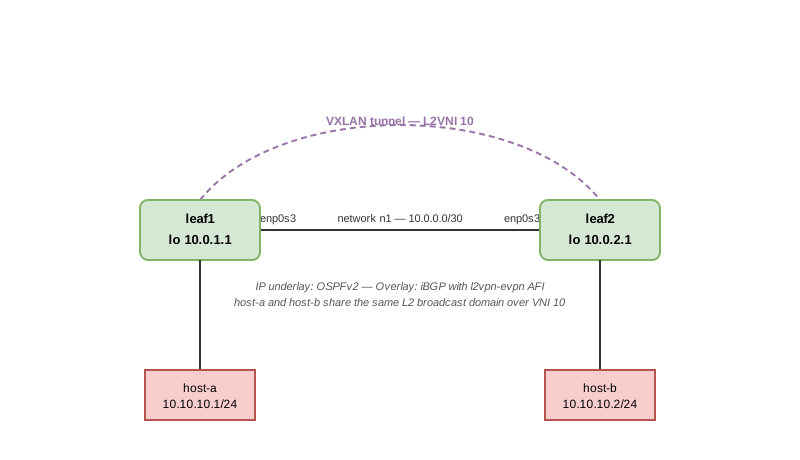
| Underlay | OSPFv2 in area 0 over a single /30 link |
| Overlay | iBGP between the two loopbacks with the l2vpn-evpn AFI |
| L2 service | VXLAN VNI 10, host-facing ports enslaved to a Linux bridge |
The same recipe scales to a leaf-spine fabric — add more leafs, point each new iBGP session at a route reflector, and assign each customer L2 segment its own VNI. Two leafs is the minimum that demonstrates VTEP-to-VTEP MAC distribution; no third device is required.
Prerequisites
flockdinstalled onleaf1andleaf2. See Installation.- Each leaf has at least two interfaces: one toward the other leaf (the transit link) and one toward its locally-attached host.
- Each host runs a stock Linux that can
ping.
This example uses two interfaces per leaf, named with Debian's predictable
naming scheme: enp0s3 (transit, toward the other leaf) and enp0s4
(host-facing). Substitute whatever your environment uses.
Step 1 — Underlay IP addressing
Set the loopback IP and transit IP on each leaf.
On leaf1:
# ip addr add 10.0.1.1/32 dev lo
# ip link set lo up
# ip addr add 10.0.0.1/30 dev enp0s3
# ip link set enp0s3 up
On leaf2:
# ip addr add 10.0.2.1/32 dev lo
# ip link set lo up
# ip addr add 10.0.0.2/30 dev enp0s3
# ip link set enp0s3 up
The host-facing port joins the bridge in the next step, so it needs no IP on the leaf side — just bring it up on each leaf:
leaf1# ip link set enp0s4 up
leaf2# ip link set enp0s4 up
Assign IPs to the hosts themselves so they can talk over the L2 segment:
host-a# ip addr add 10.10.10.1/24 dev <port toward leaf1>
host-b# ip addr add 10.10.10.2/24 dev <port toward leaf2>
Step 2 — VXLAN and bridge
flockd does not create VXLAN or bridge interfaces — it learns about them
from the kernel and drives BGP-EVPN signalling for them. Create them with
ip link.
On leaf1:
# Create the VXLAN tunnel interface for L2VNI 10.
#
#   id 10               L2VNI value
#   local 10.0.1.1      our VTEP source IP (the loopback)
#   dstport 4789        standard VXLAN UDP port
#   nolearning          EVPN drives MAC learning, not the data plane
ip link add vxlan10 type vxlan id 10 local 10.0.1.1 dstport 4789 nolearning

# Create the bridge that joins the VXLAN with the host-facing port.
ip link add br10 type bridge

# Enslave the VXLAN and the host-facing port to the bridge.
# enp0s4 here is the host-facing interface — substitute your own.
ip link set vxlan10 master br10
ip link set enp0s4 master br10

# Bring it all up.
ip link set vxlan10 up
ip link set br10 up
On leaf2:
# Create the VXLAN tunnel interface for L2VNI 10.
#
#   id 10               L2VNI value
#   local 10.0.2.1      our VTEP source IP (the loopback)
#   dstport 4789        standard VXLAN UDP port
#   nolearning          EVPN drives MAC learning, not the data plane
ip link add vxlan10 type vxlan id 10 local 10.0.2.1 dstport 4789 nolearning

# Create the bridge that joins the VXLAN with the host-facing port.
ip link add br10 type bridge

# Enslave the VXLAN and the host-facing port to the bridge.
# enp0s4 here is the host-facing interface — substitute your own.
ip link set vxlan10 master br10
ip link set enp0s4 master br10

# Bring it all up.
ip link set vxlan10 up
ip link set br10 up
Step 3 — flockd configuration
flockd watches /etc/flockd/flockd.json and re-reads it on change, so no
daemon restart is needed — saving the file is enough.
/etc/flockd/flockd.json on leaf1:
{
    "ospfv2": {
        "vrfs": {
            "default": {
                "router_id": "10.0.1.1",
                "areas": {
                    "0.0.0.0": {
                        "intfs": {
                            "lo": {},
                            "enp0s3": {
                                "hello_interval": 1,
                                "ospf_intf_type": "point-to-point"
                            }
                        }
                    }
                }
            }
        }
    },
    "bgp": {
        "asn": 65000,
        "id": "10.0.1.1",
        "vrfs": {
            "default": {
                "neighs": {
                    "10.0.2.1 10.0.1.1": {
                        "asn": 65000,
                        "afis": {
                            "l2vpn-evpn": {}
                        }
                    }
                }
            }
        }
    }
}
/etc/flockd/flockd.json on leaf2:
{
    "ospfv2": {
        "vrfs": {
            "default": {
                "router_id": "10.0.2.1",
                "areas": {
                    "0.0.0.0": {
                        "intfs": {
                            "lo": {},
                            "enp0s3": {
                                "hello_interval": 1,
                                "ospf_intf_type": "point-to-point"
                            }
                        }
                    }
                }
            }
        }
    },
    "bgp": {
        "asn": 65000,
        "id": "10.0.2.1",
        "vrfs": {
            "default": {
                "neighs": {
                    "10.0.1.1 10.0.2.1": {
                        "asn": 65000,
                        "afis": {
                            "l2vpn-evpn": {}
                        }
                    }
                }
            }
        }
    }
}
The two configs are deliberately symmetric. Each one:
- Runs OSPFv2 area 0 on
lo(so the loopback is reachable from the peer) and on the transit interface. - Peers over iBGP from its loopback to the other leaf's loopback.
- Enables the
l2vpn-evpnAFI on that neighbor — the only address family needed for an L2VNI service. IPv4 underlay reachability is provided by OSPFv2, not by this BGP session.
Step 4 — Verify the control plane
flockc is the local gRPC client. Run the queries below on either leaf;
allow ten seconds or so for OSPF and BGP to converge.
Check both protocols are enabled:
flock@leaf1:~$ flockc sys overview
{..."enabled_protocols":["BGPv4","OSPFv2","Static"], ...}
OSPFv2 adjacency on enp0s3 reaches Full:
flock@leaf1:~$ flockc ospfv2 instances
[{"my_router":{"id":"10.0.1.1", ...}, ..., "stats":{...,"neigh_state_count":{...,"full":1}}}]
BGP neighbor reaches established:
flock@leaf1:~$ flockc bgp overview
{"id":"10.0.1.1","asn":65000, ...,"neighbor_summary":{"default":{"count":1,"established":1,"send_converged":1,"recv_converged":1}}}
Local NVE for VNI 10:
flock@leaf1:~$ flockc bgp evpn nve walk
[{"vni":10,"local_vtep_ip":"10.0.1.1","rd":"1:10.0.1.1:2","local_macs":[{"mac":"52:54:00:12:34:56","ips":[...],"seq":0}]}]
The single entry shows VNI 10, local VTEP IP 10.0.1.1, and one row per
host MAC the bridge has learned. Each MAC carries the set of host IPs
(ips) resolved for it from the neighbour table; the MAC is advertised by
a MAC-only route, and a MAC+IP route is advertised for each resolved IP.
EVPN RIB:
flock@leaf1:~$ flockc bgp evpn rib walk
[{"prefix":{"rd":"1:10.0.1.1:2","net":{"route":{"Type2MacIp":{...,"mac_addr":"52:54:00:12:34:56"}}}}, ...},
 {"prefix":{"rd":"1:10.0.1.1:2","net":{"route":{"Type3Imet":{...,"originating_router_ip":"10.0.1.1"}}}}, ...},
 {"prefix":{"rd":"1:10.0.2.1:2","net":{"route":{"Type2MacIp":{...,"mac_addr":"52:54:00:12:34:56"}}}}, ...},
 {"prefix":{"rd":"1:10.0.2.1:2","net":{"route":{"Type3Imet":{...,"originating_router_ip":"10.0.2.1"}}}}, ...}]
Four entries: a Type-3 (Inclusive Multicast Ethernet Tag, IMET) route from each VTEP — the announcement "I'm a VTEP for VNI 10" — and a Type-2 (MAC/IP advertisement) route for each locally-learned host MAC.
Step 5 — Generate traffic
Ping host-b from host-a:
host-a# ping -c 3 10.10.10.2
The first packet may be lost while ARP completes over VXLAN; subsequent packets succeed. This proves the data plane carries L2 traffic between the two hosts over the VXLAN tunnel using the MACs distributed by the EVPN control plane.
Cleanup
To tear down the VXLAN/bridge interfaces on each leaf:
# ip link delete br10
# ip link delete vxlan10
To stop the protocols, remove the bgp and ospfv2 blocks from
/etc/flockd/flockd.json and stop flockd. A protocol that is already
running keeps running when its block is removed.
# systemctl stop flockd
Where to go next
- The BGP Component chapter covers the full EVPN configuration surface, including L3VNI for inter-subnet routing, Ethernet Segments for multi-homing, and route targets.
- For a leaf-spine fabric with a route reflector, replace each leaf's single
iBGP neighbor with a peering to the RR and configure
route_reflector_clienton the RR.
Flock Routing Suite Daemon flockd
Overview
The flockd process is controlled by systemd.
$ systemctl status flockd
# systemctl start flockd
# systemctl stop flockd
flockd is a single process that is split into separate components.
System Component
The system component manages the other components and presents a unified API to the outside world.
The system component monitors external signals and updates the other components as required. Example external signals would be the addition of an IP address to an interface, or the addition of a route to the Linux Kernel.
The system component provides the configuration and operations API.
Routing Information Base (RIB) Component
The RIB component receives route updates from other components and from the Linux Kernel. The RIB component selects the best update for each route and redistributes it to other components and to the Linux Kernel. This redistribution can be controlled by configuration. By default the RIB will send the best route to the Linux Kernel. From the Linux Kernel it takes the routes the local host installs, for example with ip route add or from DHCP. Connected routes are derived from the interface addresses.
The RIB component also includes the Label RIB (LRIB) which manages MPLS label bindings programmed by protocols such as BGP and OSPF Segment Routing.
Multicast RIB (mRIB) Component
The mRIB component holds the multicast (S,G) forwarding entries derived by PIM, and flockd programs them into the Linux Kernel multicast forwarding table of their VRF.
OSPF Components
The OSPF components run the OSPFv2 and OSPFv3 protocols. These components get interface state information and connected IP subnet information from the System Component. These components get external state information by connecting to OSPF neighbors via Linux Kernel raw IP sockets. This information is combined and each best route is derived and sent to the RIB component.
BGPv4 Component
The BGPv4 component runs the BGPv4 protocol. This component gets IP route information from the RIB component and external state information by connecting to BGP neighbors via Linux Kernel TCP sockets. This information is combined and each best route is derived and sent to the RIB component.
PIM Component
The PIM component runs PIM Source-Specific Multicast in each configured VRF. An embedded IGMP instance on each PIM interface learns which multicast traffic local hosts want. PIM resolves the path back to each source from the RIB, and sends each (S,G) that is ready to forward to the mRIB component.
BFD Component
The BFD (Bidirectional Forwarding Detection) component provides sub-second failure detection for routing protocols. BFD sessions are created by protocols (BGP, OSPF, static routes) rather than configured directly. When a BFD session detects that a neighbor is unreachable, the associated protocol is notified immediately, enabling faster convergence than relying on protocol-level hello timers alone.
Static Component
The Static component manages the configuration of IPv4/IPv6 static routes. Static routes have a default administrative distance of 1 and therefore are preferred over dynamic routes by default. However, Static component allows you to specify a non-default administrative distance, thereby allowing a static route to be used as a backup route to a dynamic route. The configured static routes can be either recursive or non-recursive by specifying an explicit outgoing interface.
Multithreading
The routing suite runs in a single process and each component runs in its own thread. One way to view the active threads is via the Linux /proc virtual file system. The System component runs on the flockd thread. The RIB, mRIB, BGP, BFD, OSPFv2, OSPFv3, Static and PIM components are each allocated a thread when flockd starts, whether or not they are configured.
BGP and OSPF share a thread pool, which has a thread for each logical CPU core on the router. The pool is started the first time it is needed, and its threads take the name of the thread that started it. flockc sys overview reports the size of the pool as global_thread_pool_size, and starts the pool if nothing has yet.
flock@flocknet:~$ grep Name /proc/`pidof flockd`/task/*/status
/proc/409/task/409/status:Name: flockd
/proc/409/task/431/status:Name: RIB
/proc/409/task/432/status:Name: mRIB
/proc/409/task/433/status:Name: BGP
/proc/409/task/434/status:Name: BFD
/proc/409/task/435/status:Name: OSPFv2
/proc/409/task/436/status:Name: OSPFv3
/proc/409/task/437/status:Name: STATIC
/proc/409/task/438/status:Name: PIM
/proc/409/task/440/status:Name: BGP
/proc/409/task/441/status:Name: BGP
/proc/409/task/442/status:Name: BGP
/proc/409/task/443/status:Name: BGP
flock@flocknet:~$
In the example above:
-
The entire routing suite is running in a single process (process id
409). -
The thread with thread id
409is theflockdsystem thread. -
The thread with thread id
433is the BGP thread. The threads with id's440,441,442and443belong to the shared thread pool, which BGP started. There are 4 threads in the pool as the router has 4 logical CPU's.flock@flocknet:~$ cat /proc/cpuinfo | grep -c processor 4 flock@flocknet:~$ -
The current CPU and memory ulitization of each thread can be viewed using
  flock@flocknet:~$ top -H -p `pidof flockd`
  PID USER      PR  NI    VIRT    RES    SHR S  %CPU  %MEM     TIME+ COMMAND
  525 root      20   0  280708   4460   4008 S   0.3   0.4   0:00.96 STATIC
  518 root      20   0  280708   4460   4008 S   0.0   0.4   0:01.38 flockd
  523 root      20   0  280708   4460   4008 S   0.0   0.4   0:02.06 BGP
  526 root      20   0  280708   4460   4008 S   0.0   0.4   0:01.29 RIB
  535 root      20   0  280708   4460   4008 S   0.0   0.4   0:00.96 BGP
  flock@flocknet:~$
Logging
Logging can be viewed using journalctl.
View flockd logs since router was booted.
# journalctl -u flockd --boot
-- Logs begin at Fri 2020-01-10 14:01:47 GMT, end at Mon 2020-06-29 09:38:44 BST. --
Jun 29 08:49:36 r61 flockd[455]: [INFO  flockd] START: PID=455, Compile Mode=Release, Log Level="info"
...
View flockd logs since a certain time.
# journalctl -u flockd --since "2020-06-26 17:19:20"
-- Logs begin at Fri 2020-01-10 14:01:47 GMT, end at Mon 2020-06-29 09:40:55 BST. --
Jun 26 17:19:20 r61 flockd[431]: [INFO  flockd::bgp::bgp_neigh] 90.0.93.70/Some(BgpId(70.0.100.70)) BgpAsn2(70) Outgoing FSM state change OpenConfirm -> Established
...
Monitor for the latest flockd logs.
# journalctl -u flockd --follow
-- Logs begin at Fri 2020-01-10 14:01:47 GMT. --
Jun 29 09:44:34 r61 flockd[455]: [INFO  flockd::bgp::bgp_neigh] 60.0.60.60/Some(BgpId(60.0.100.60)) BgpAsn2(60) Incoming FSM state change OpenConfirm -> Established
...
Log Levels
Log levels can be set using the RUST_LOG environment variable.
Flock Routing Suite Client: flockc
flockc is the CLI client bundled with flockd for monitoring and configuring the router. It talks to flockd over gRPC (Protocol Buffers over HTTP/2) and supports both read operations (querying operational state) and write operations (applying configuration updates, e.g. BGP neighbor and VRF configuration).
flockc connects to the gRPC endpoint (default http://[::1]:50051) and supports multiple output formats.
Global Options
flockc [OPTIONS] <COMMAND>

Options:
  -e, --endpoint <ENDPOINT>  [env: FLOCK_ENDPOINT=] [default: http://[::1]:50051]
  -f, --format <FORMAT>      [default: json] [possible values: debug, debug-pretty, json, json-pretty, yaml]
  -h, --help                 Print help
  -V, --version              Print version
-e selects the gRPC endpoint and -f the output format. Every command and subcommand accepts --help.
Connecting to a Remote Router
By default, flockc connects to the local flockd instance via IPv6 loopback, which is also the only address flockd listens on unless the system configuration names another:
"system": {
    "api": {
        "grpc": {
            "bind_ip_addr": "::",
            "bind_port": 50051
        }
    }
}
Both fields are optional and default to ::1 and 50051. flockd reads them only when it starts, so a change to them takes effect the next time flockd starts. To connect to a remote router, set the endpoint:
flockc -e http://10.0.1.1:50051 sys overview
Or via the FLOCK_ENDPOINT environment variable:
export FLOCK_ENDPOINT=http://10.0.1.1:50051
flockc sys overview
Commands
Each top-level command queries one component. This chapter covers sys and bgp in detail; the component chapters cover the rest.
| Command | Queries | Documented in |
|---|---|---|
sys | System overview, VRFs and interfaces | System Component |
bgp | BGP state and configuration | This chapter and BGP Component |
static | Static routes | Static Component |
rib | Unicast RIB | RIB Component |
lrib | Label RIB | RIB Component |
mrib | Multicast RIB | Multicast RIB Component |
igmp | IGMP interfaces and group membership | IGMP Component |
bfd | BFD sessions | BFD Component |
ospfv2 | OSPFv2 instances | OSPFv2 Component |
ospfv3 | OSPFv3 instances | OSPFv3 Component |
pim | PIM VRFs, interfaces, neighbors and (S,G) state | PIM Component |
subscribe | A stream of operational-state changes, printed as each arrives until interrupted | PIM Component |
System Commands
System Overview
Returns system information including hostname, software version, uptime, enabled protocols, software error count, and whether maintenance mode is set.
$ flockc -f json-pretty sys overview
{
  "host_info": {
    "hostname": "R01",
    "domain": null,
    ...
  },
  "system_info": {
    "name": "flockd",
    "description": "The Flock Networks Ltd Routing Suite Daemon",
    ...
    "version": "0.0.2",
    ...
  },
  "fire_info": {
    "name": "fire",
    "description": "Flock Internet Routing Engine (FIRE)",
    ...
    "version": "0.1.0",
    ...
  },
  "pid": 12345,
  "log_level": "info",
  "uptime": "days: 1, hours: 3, mins: 22, secs: 15",
  "enabled_protocols": ["BGPv4", "OSPFv2", "Static"],
  "software_errors": 0,
  "global_thread_pool_size": 10,
  "maintenance_mode": false
}
sys vrf <name>, sys list-interfaces and sys interface <name> are described in the System Component chapter.
List VRFs
Returns all VRFs configured on the system.
$ flockc sys list-vrfs
[{"vrf_id":254,"vrf_name":"default","underlay_vrf_name":null,...}]
BGP Commands
BGP Overview
Returns the BGP instance overview including BGP ID, ASN, route counts per VRF, and neighbor summary.
$ flockc -f json-pretty bgp overview
{
  "id": "70.0.100.70",
  "asn": 70,
  "route_server": false,
  "route_reflector": false,
  ...
  "total_event_loops": 571,
  ...
  "routes": {
    "unicast_routes": {
      "default": {
        "ipv4_unicast": { "route_count": 3, "attr_list_store_count": 1 },
        "ipv6_unicast": { "route_count": 0, "attr_list_store_count": 0 }
      }
    },
    "vpn_routes": {}
  },
  "neighbor_summary": {
    "default": {
      "count": 4,
      "established": 4,
      "send_converged": 4,
      "recv_converged": 4
    }
  }
}
List BGP VRFs
$ flockc bgp list-vrfs
[{"vrf_id":254,"vrf_name":"default","vrf_info":{...,"neighs":["90.0.93.61","70.0.100.73 70.0.100.70",...]},...}]
BGP Event Log
Returns the BGP event log showing neighbor state changes.
$ flockc -f json-pretty bgp event-log
{
  "object_oper": {
    "db": [
      {
        "event": "AddOrUpdate",
        "object_desc": "BGP Peer VrfId(254) 90.0.93.61",
        "time": "2026-02-27T13:42:00.015Z"
      },
      {
        "event": "Up",
        "object_desc": "BGP Peer VrfId(254) 90.0.93.61",
        "time": "2026-02-27T13:42:00.185Z"
      },
      ...
    ]
  }
}
BGP VRF Commands
All VRF-scoped commands use the form flockc bgp vrf <name> <command>.
Show a VRF
Returns the named VRF's row from bgp list-vrfs, including its neighbor list.
$ flockc bgp vrf default show
Unicast RIB Lookup
Look up a single prefix in the BGP unicast RIB.
$ flockc bgp vrf default rib lookup 50.0.0.0/8
Unicast RIB Walk
Walk the BGP unicast RIB starting from a root prefix. Supports pagination via --start-from and --max-entries.
# Walk all routes
$ flockc bgp vrf default rib walk 0.0.0.0/0

# Walk with pagination (1 entry at a time)
$ flockc bgp vrf default rib walk 0.0.0.0/0 --max-entries 1

# Continue from a specific prefix
$ flockc bgp vrf default rib walk 0.0.0.0/0 --start-from 60.0.0.0/8 --max-entries 1
Each entry in the walk response includes a finished field indicating whether there are more entries to retrieve.
Unicast RIB Statistics
# Basic counters
$ flockc bgp vrf default rib stats

# Include memory usage details
$ flockc bgp vrf default rib stats --memory
Returns IPv4 and IPv6 counters: total prefixes, path counts by type (iBGP, eBGP, originated, redistributed, VPN-imported), and optionally memory usage per RIB entry.
De-aggregation Labels
$ flockc bgp vrf default rib deagg-labels
Redistribution Policy
$ flockc bgp vrf default redist-policy
Returns the redistribution policy status and statistics including hit counts and accept/reject counters.
VPN Policy Statistics
$ flockc bgp vrf default vpn policy-stats
BGP Neighbor Commands
Neighbor commands use the form flockc bgp vrf <vrf> neigh <addr> <command>.
The neighbor address is the neighbor's IP address (90.0.93.61). A neighbor configured with a local source address, keyed "70.0.100.72 70.0.100.70" in the configuration, is named by its own address alone (70.0.100.72). A link-local IPv6 neighbor also names its interface as a scope (fe80::2%eth0).
Show Neighbor
# Basic neighbor info
$ flockc bgp vrf default neigh 90.0.93.61 show

# Include detailed statistics
$ flockc bgp vrf default neigh 90.0.93.61 show --stats
Returns neighbor state (Established/Idle/etc.), capabilities, timers, keepalive counters, and optionally per-AFI statistics including policy hit counts and adj-rib prefix counts.
Reset Neighbor
$ flockc bgp vrf default neigh 90.0.93.61 reset soft-in
$ flockc bgp vrf default neigh 90.0.93.61 reset soft-out
$ flockc bgp vrf default neigh 90.0.93.61 reset hard
$ flockc bgp vrf default neigh 90.0.93.61 reset refresh-in
$ flockc bgp vrf default neigh 90.0.93.61 reset refresh-out
Adjacency RIB Commands
Look up one prefix in, or walk the whole of, the routes received from or
advertised to a specific neighbor. Every scope takes the direction, in
or out, before the command.
# Routes received from neighbor (adj-rib-in)
$ flockc bgp vrf default neigh 90.0.93.61 adj-rib-unicast in walk 0.0.0.0/0

# Routes advertised to neighbor (adj-rib-out)
$ flockc bgp vrf default neigh 90.0.93.61 adj-rib-unicast out walk 0.0.0.0/0

# One prefix rather than the whole table
$ flockc bgp vrf default neigh 90.0.93.61 adj-rib-unicast in lookup 10.0.0.0/24

# RTC adj-rib
$ flockc bgp vrf default neigh 90.0.93.61 adj-rib-rtc in walk
$ flockc bgp vrf default neigh 90.0.93.61 adj-rib-rtc in lookup <rtc-net>

# VPN adj-rib, keyed by route distinguisher and prefix
$ flockc bgp vrf default neigh 90.0.93.61 adj-rib-vpn in lookup <rd> <ip-net>
$ flockc bgp vrf default neigh 90.0.93.61 adj-rib-vpn in walk <rd> <ip-net>

# Private adj-rib, which takes the address family before the direction
$ flockc bgp vrf default neigh 90.0.93.61 adj-rib-private ipv4-unicast in walk 0.0.0.0/0
Each adj-rib-in path carries not_in_rib_reason, which says why the path is not in the BGP RIB; see the BGP Component chapter.
BGP VPN RIB Commands
VPN RIB Lookup
$ flockc bgp vpn-rib lookup <rd> <ip-net>
VPN RIB Walk
$ flockc bgp vpn-rib walk <rd> <ip-net> [--start-from-rd <rd>] [--start-from-ip-net <ip-net>] [--max-entries N] [--walk-rds]
VPN RIB Statistics
$ flockc bgp vpn-rib stats [--af <ipv4|ipv6>] [--rd <rd>] [--memory]
BGP RTC RIB Commands
RTC RIB Lookup
$ flockc bgp rtc-rib lookup <rtc-net>
An RTC network is either Default or origin_as:<asn>,<route-target>, for example origin_as:200,route-target:0:100:100. The same form is taken by adj-rib-rtc ... lookup, and a malformed one is refused before any request is sent.
RTC RIB Walk
$ flockc bgp rtc-rib walk
BGP AFI RIB Commands
Query AFI-specific RIBs (e.g., EVPN).
$ flockc bgp vrf default afi-rib <afi> lookup <prefix>
$ flockc bgp vrf default afi-rib <afi> walk <root> [--start-from <prefix>] [--max-entries N]
BGP EVPN Commands
$ flockc bgp evpn rib walk [<rd>]
$ flockc bgp evpn rib lookup <rd> <ip-addr>
$ flockc bgp evpn nve walk [--vni <vni>]
$ flockc bgp evpn es walk
$ flockc bgp evpn es lookup <esi>
BGP Configuration Commands
The gRPC API supports reading and updating BGP configuration. Configuration changes use a pending-config workflow: changes are staged locally in a .bgp_pending_config file, then applied atomically to the running router.
Show Current Configuration
# Full configuration
$ flockc bgp config show

# Configuration for a specific VRF
$ flockc -f json-pretty bgp config show --vrf default
[
  {
    "name": "default",
    "multipath": false,
    "neighs": [
      {
        "key": { "dst": { "version": { "V4": 1509973309 } }, "src": null },
        "asn": 60,
        "local_as": 70,
        "route_reflector_client": false,
        "next_hop_self": false,
        "disabled": false,
        "connect_mode": "Both",
        ...
      }
    ],
    "networks": [
      { "prefix": "70.0.0.0/8", "originate_always": false }
    ],
    ...
  }
]
Pending Configuration Workflow
Configuration changes follow a four-step workflow: initialize, stage, review, apply.
Step 1: Initialize
Create a fresh pending configuration staging file:
$ flockc bgp config init
initialized .bgp_pending_config
Step 2: Stage Changes
Stage one or more changes. Multiple changes can be staged before applying:
$ flockc bgp config set --asn 65001
$ flockc bgp config vrf default set --multipath true
$ flockc bgp config vrf default neigh 10.0.0.1 set --asn 65002
Step 3: Review Pending Changes
Inspect what will be applied before committing:
$ flockc bgp config show-pending
Step 4: Apply
Apply all staged changes atomically to the running router:
$ flockc bgp config apply
config applied
Example: Adding a BGP Neighbor
# Initialize pending config
$ flockc bgp config init
initialized .bgp_pending_config

# Stage the new neighbor
$ flockc bgp config vrf default neigh 10.99.99.1 set --asn 65099 --local-as 70

# Review - the pending config shows the staged addition
$ flockc bgp config show-pending
{"asn":null,...,"vrfs":{"clear":false,"ops":[{"name":"default","delete":false,
  "neighs":{"clear":false,"ops":[{"key":{"dst":{"version":{"V4":174285569}},
  "src":null,"zone":null},"delete":false,"asn":{"v":{"Set":65099}},
  "local_as":{"v":{"Set":70}},...}]}}]}}

# Apply to the running router
$ flockc bgp config apply
config applied

# Verify - neighbor count increased and the new neighbor is visible
$ flockc bgp overview
{...,"neighbor_summary":{"default":{"count":5,"established":4,...}}}

$ flockc bgp vrf default neigh 10.99.99.1 show
{"common":{"neigh_key":"10.99.99.1","asn":65099,"local_as":70,
  "neigh_type":"External","connect_mode":"Both",...},...}
Example: Deleting a BGP Neighbor
# Initialize pending config
$ flockc bgp config init
initialized .bgp_pending_config

# Stage the deletion
$ flockc bgp config vrf default neigh 10.99.99.1 delete

# Review - the pending config shows delete:true
$ flockc bgp config show-pending
{"asn":null,...,"vrfs":{"clear":false,"ops":[{"name":"default","delete":false,
  "neighs":{"clear":false,"ops":[{"key":{"dst":{"version":{"V4":174285569}},
  "src":null,"zone":null},"delete":true,...}]}}]}}

# Apply to the running router
$ flockc bgp config apply
config applied

# Verify - neighbor count decreased and the neighbor is gone
$ flockc bgp overview
{...,"neighbor_summary":{"default":{"count":4,"established":4,...}}}

$ flockc bgp vrf default neigh 10.99.99.1 show
null
Configuration Set Options
Boolean options take an explicit true or false, so a staged change can turn a setting off as well as on.
Global BGP settings:
$ flockc bgp config set [--asn <ASN>] [--route-server <true|false>] [--route-reflector <true|false>]
VRF settings:
$ flockc bgp config vrf <name> set [--multipath <true|false>] [--redist-policy <policy>]
$ flockc bgp config vrf <name> delete
Neighbor settings:
$ flockc bgp config vrf <name> neigh <addr> set \
    [--asn <ASN>] [--local-as <ASN>] \
    [--route-reflector-client <true|false>] [--next-hop-self <true|false>] \
    [--disabled <true|false>] [--connect-mode <mode>] \
    [--auth-password-file <path> | --clear-auth-password-file]
$ flockc bgp config vrf <name> neigh <addr> delete
--connect-mode takes Active, Passive or Both, in any case; bgp config show writes it capitalised. --auth-password-file names a TCP-MD5 key file by its absolute path on the flockd host, and --clear-auth-password-file removes the key; see the BGP Component chapter.
Output Formats
flockc supports five output formats via the -f flag:
| Format | Description |
|---|---|
json | Compact JSON (default) |
json-pretty | Pretty-printed JSON |
yaml | YAML format |
debug | Rust debug format |
debug-pretty | Rust debug format, pretty-printed |
Example using YAML:
$ flockc -f yaml bgp vrf default rib stats
v4:
  counters:
    total_prefixes: 3
    num_ibgp_regular_paths: 0
    num_ebgp_regular_paths: 2
    num_originated_paths: 1
    ...
v6:
  counters:
    total_prefixes: 0
    ...
An object that does not exist is printed as null (or an empty list), and errors are written to standard error. flockc exits with status 0 when a command succeeds, including a lookup that finds nothing, and non-zero when it fails -- a command line it cannot parse, a connection it cannot make, or a request flockd refuses.
3rd Party gRPC Clients
Since the gRPC API uses standard Protocol Buffers and HTTP/2, any gRPC client library can connect to flockd. The .proto service definitions are located in the flock_grpc/proto/ directory.
Available Services
A service is served only when flockd is built with the component behind it.
| Service | Proto File | Description |
|---|---|---|
flock.sys.Sys | sys_oper.proto | System overview, VRFs and interfaces |
flock.bgp.Bgp | bgp_oper.proto | BGP operational state queries |
flock.bgp.BgpConfiguration | bgp_config.proto | BGP configuration read/write |
flock.static_routing.StaticRouting | static_routing_oper.proto | Static route state |
flock.rib.Rib | rib_oper.proto | Unicast RIB state |
flock.lrib.LRib | lrib_oper.proto | Label RIB state |
flock.mrib.Mrib | mrib_oper.proto | Multicast RIB state |
flock.bfd.Bfd | bfd_oper.proto | BFD sessions |
flock.ospf.Ospf | ospf_oper.proto | OSPFv2 and OSPFv3 state |
flock.pim.Pim | pim_oper.proto | PIM state, and a stream of per-interface changes |
flock.igmp.Igmp | igmp_oper.proto | IGMP interfaces and group membership |
Example: Connecting with grpcurl
flockd does not serve gRPC reflection, so give grpcurl the proto files:
# List the services a proto file defines
grpcurl -import-path flock_grpc/proto -proto sys_oper.proto list

# Get system overview
grpcurl -plaintext -import-path flock_grpc/proto -proto sys_oper.proto \
    '[::1]:50051' flock.sys.Sys/GetOverview

# Get BGP overview
grpcurl -plaintext -import-path flock_grpc/proto -proto bgp_oper.proto \
    -d '{}' '[::1]:50051' flock.bgp.Bgp/GetOverview
Example: Connecting with Python
import grpc
# Generated from sys_oper.proto and common.proto using grpc_tools.protoc
import sys_oper_pb2, sys_oper_pb2_grpc

channel = grpc.insecure_channel('[::1]:50051')
stub = sys_oper_pb2_grpc.SysStub(channel)
response = stub.GetOverview(sys_oper_pb2.GetOverviewRequest())
print(response)
gRPC Command Reference
The RPCs of the system and BGP services are listed below. Each other service's RPCs are listed in its proto file.
System Service RPCs (flock.sys.Sys)
| RPC | Description |
|---|---|
GetOverview | System overview (hostname, version, uptime, protocols, errors, maintenance mode) |
ListVrfs | List all VRFs |
GetVrf | One VRF, by name |
ListInterfaces | List all interfaces |
GetInterface | One interface, by interface id |
BGP Operational Service RPCs (flock.bgp.Bgp)
| RPC | Description |
|---|---|
GetOverview | BGP instance overview (ASN, BGP ID, route counts, neighbor summary) |
ListVrfs | List BGP VRFs with neighbor info |
GetNeighbor | Neighbor details with optional statistics |
ResetNeighbor | Reset a BGP neighbor session |
GetEventLog | BGP event log |
GetRedistPolicy | Route redistribution policy and stats |
GetVpnPolicyStats | VPN import/export policy stats |
UnicastRibLookup | Look up a single unicast route |
UnicastRibWalk | Walk the unicast RIB with pagination |
UnicastRibStats | Unicast RIB statistics with optional memory |
GetSourceDeAggLabels | De-aggregation label information |
VpnRibLookup | Look up a single VPN route |
VpnRibWalk | Walk the VPN RIB with pagination |
VpnRibStats | VPN RIB statistics |
RtcRibLookup | Look up a single RTC route |
RtcRibWalk | Walk the entire RTC RIB |
AfiRibLookup | AFI-specific RIB lookup |
AfiRibWalk | AFI-specific RIB walk |
AdjRibUnicastLookup | Adjacency RIB unicast lookup |
AdjRibUnicastWalk | Adjacency RIB unicast walk |
AdjRibVpnLookup | Adjacency RIB VPN lookup |
AdjRibVpnWalk | Adjacency RIB VPN walk |
AdjRibRtcLookup | Adjacency RIB RTC lookup |
AdjRibRtcWalk | Adjacency RIB RTC walk |
AdjRibPrivateLookup | Adjacency RIB private lookup |
AdjRibPrivateWalk | Adjacency RIB private walk |
EvpnRibLookup | EVPN RIB lookup |
EvpnRibWalk | EVPN RIB walk, optionally for one RD |
EvpnNveWalk | EVPN NVE state, optionally for one VNI |
EvpnEsLookup | One EVPN Ethernet Segment |
EvpnEsWalk | All EVPN Ethernet Segments |
BGP Configuration Service RPCs (flock.bgp.BgpConfiguration)
| RPC | Description |
|---|---|
GetBgpConfig | Read the full BGP configuration |
UpdateBgpConfig | Apply a configuration update |
System Component
Configuration Overview
The system configuration is held under the top level system object in /etc/flockd/flockd.json. The system object must exist but can be left empty.
flock@flocknet:~$ cat /etc/flockd/flockd.json
{
    "system": {}
}
flock@flocknet:~$
Configuration in detail
Filtering interfaces in system component
System component receives interfaces from the Linux kernel. Interfaces not used by any routing component can be filtered out at the system component level by using intf_denylist JSON object.
This configuration will ignore interface eth0 and all interfaces starting with en:
"system": {
    ...
    "intf_denylist": [
        # Specify the entire interface name i.e. "eth0"
        # or use ^ to match the start of interface names
        #   e.g. "^en" will match all interfaces that start with "en"
        # Multiple interface names and patterns can be used
        "eth0",
        "^en"
    ]
},
The intf_denylist object is optional. If it is not specified, all interfaces present in kernel will also be present in system component.
The filtered out interfaces will not be present in the flockc sys list-interfaces output.
Draining traffic for maintenance
Setting maintenance_mode tells OSPF to advertise this router as
undesirable transit, so traffic drains away from it before the work
starts. OSPF raises the metric of its transit links and of the external
prefixes it originates (RFC 6987), leaving the prefixes local to the
router reachable. BGP does not yet act on the setting beyond
re-advertising its routes unchanged:
"system": {
    ...
    "maintenance_mode": true
},
The key is optional and defaults to false. It is configuration rather
than a command so that a router left draining is still draining after a
restart. flockd reloads flockd.json without a restart, so clearing
it puts the router back into service.
flockc sys overview reports the current setting as maintenance_mode.
gRPC API endpoint
The optional api.grpc object sets the address and port flockd serves its gRPC API on, which flockc and other gRPC clients connect to. Both fields default to the values shown. flockd reads api.grpc only when it starts, so a change to it takes effect the next time flockd starts:
"system": {
    ...
    "api": {
        "grpc": {
            "bind_ip_addr": "::1",
            "bind_port": 50051
        }
    }
},
Operational State Overview
Check status of flockd
flock@r70:~$ flockc sys overview
{"host_info":{"hostname":"r70", ...},"system_info":{"name":"flockd","description":"The Flock Networks Ltd Routing Suite Daemon","profile":"Release", ...},"pid":1234,"log_level":"info","uptime":"days: 0, hours: 0, mins: 0, secs: 19","enabled_protocols":["BGPv4","OSPFv2","Static"],"software_errors":0, ...}
Show all system interfaces
flock@r70:~$ flockc sys list-interfaces
[{"base":{"intf_name":"lo","intf_id":1, ...,"intf_type":"loopback","intf_mtu":65536,"intf_mac":null,"intf_state":"up", ...},"ip_prefixes":["127.0.0.1/8","70.0.100.70/32","::1/128"]},{"base":{"intf_name":"r70-n70","intf_id":125675, ...,"intf_type":"broadcast","intf_mtu":1500,"intf_mac":"52:54:00:70:00:70","intf_state":"up", ...},"ip_prefixes":["70.0.70.70/24","fc00:46:46::46/64", ...]}, ...]
Show single system interface
flock@r70:~$ flockc sys interface r70-n70
{"base":{"intf_name":"r70-n70","intf_id":125675, ...,"intf_state":"up", ...},"ip_prefixes":["70.0.70.70/24", ...]}
Show all vrfs
flock@r70:~$ flockc sys list-vrfs
[{"vrf_id":254,"vrf_name":"default","underlay_vrf_name":null,"kernel_intf_name":null, ...}]
Show single vrf
flock@r70:~$ flockc sys vrf default
{"vrf_id":254,"vrf_name":"default","underlay_vrf_name":null,"kernel_intf_name":null, ...}
System Operation
Help
flockc sys --help
Overview
flockc sys overview
All system interfaces
flockc sys list-interfaces
Single interface
flockc sys interface <interface-name>
All vrfs
flockc sys list-vrfs
Single vrf
flockc sys vrf <vrf-name>
RIB Component
The RIB component receives routes from each routing protocol and stores them in the RIB. For each network prefix the 'best' route is sent to the dataplane for use when forwarding packets. By default, flock uses the Linux kernel as dataplane, but it can be configured to use other dataplanes.
Operational State
Stats
flock@r70:~$ flockc rib vrf default stats
{"v4":{"total_route_count":12,"active_route_count":12,"protocol_stats":[{"origin":"Connected","counters":{"total_route_count":4,"active_route_count":4},"vpn_counters":null}, ...]},"v6":{"total_route_count":3, ...}}
Longest Prefix Match (LPM) for destination
The matching prefix is returned alongside its entry.
-
fib_ip_nhsare the resolved next hops taken from the 'best' protocolflock@r70:~$ flockc rib vrf default lpm 70.0.70.1 ["70.0.70.0/24",{"protos":[{"admin_dist":0,"origin":"Connected", ...,"ip_nhs":[{"ConnectedNh":{...}}],"last_modified":"2026-08-03T09:14:22.481Z"}],"fib_ip_nhs":[{"ConnectedNh":{"table_id":{"vrf_id":254,"afi":"ipv4-unicast"},"intf_id":125675, ...}}], ...}]
Each entry in protos carries last_modified, when that protocol's route to the prefix last changed.
Single RIB prefix entry
flock@r70:~$ flockc -f json-pretty rib vrf default lookup 70.0.0.0/8
{
  "protos": [
    {
      "admin_dist": 1,
      "origin": {
        "Static": "Conf"
      },
      ...
      "ip_nhs": [
        {
          "SpecialNh": {
            "table_id": {
              "vrf_id": 254,
              "afi": "ipv4-unicast"
            },
            "special_nh_type": "Discard",
            ...
          }
        }
      ],
      ...
    }
  ],
  "fib_ip_nhs": [
    {
      "SpecialNh": {
        ...
        "special_nh_type": "Discard",
        ...
      }
    }
  ],
  ...
}
All prefix entries in the RIB
Walk starts at <root> and returns all prefixes within. Use 0.0.0.0/0 or ::/0 for the full IPv4 / IPv6 table. Only the 'best' origin protocol is shown per prefix.
    flock@r70:~$ flockc rib vrf default walk 0.0.0.0/0
    [["50.0.0.0/8",{"protos":[{"admin_dist":20,"origin":"Bgp", ...,"ip_nhs":[{"RecursiveNh":{ ...,"ip_addr":"90.0.93.61", ...}}], ...}],"fib_ip_nhs":[{"AttachedNh":{ ...,"ip_addr":"90.0.93.61", ...}}], ...}],["70.0.0.0/8",{"protos":[{"admin_dist":1,"origin":{"Static":"Conf"}, ...}], ...}],["70.0.70.0/24",{"protos":[{"admin_dist":0,"origin":"Connected", ...}], ...}], ...]
Connected routes
Connected routes installed by the system component can be looked up or walked independently via the connected subcommand. The walk selects one address family and defaults to IPv6:
flockc rib vrf <vrf-name> connected lookup <ip-network>
flockc rib vrf <vrf-name> connected walk [--af ipv4 | ipv6]
RIB Operation
Help
flockc rib --help
RIB stats
flockc rib vrf <vrf-name> stats
RIB prefix lookup
flockc rib vrf <vrf-name> lookup <ip-network>
RIB walk
flockc rib vrf <vrf-name> walk <root> [--start-from <prefix>] [--max-entries <N>]
Longest Prefix Match (LPM)
flockc rib vrf <vrf-name> lpm <ip-address>
Connected route lookup / walk
flockc rib vrf <vrf-name> connected lookup <ip-network>
flockc rib vrf <vrf-name> connected walk [--af ipv4 | ipv6]
Label RIB (LRIB)
The Label RIB manages MPLS label bindings programmed by protocols such as BGP and OSPF Segment Routing.
LRIB stats
flockc lrib stats
LRIB label lookup
flockc lrib lookup <label>
LRIB walk
flockc lrib walk
Multicast RIB (mRIB)
The multicast RIB holds the (S,G) entries flockd programs into the multicast forwarding plane, written by PIM. It is documented in the Multicast RIB Component chapter.
Multicast RIB Component
The multicast RIB (mRIB) holds the multicast forwarding entries flockd programs into the dataplane. Each entry is keyed by a source and a group -- an (S,G) -- and carries the incoming interface packets for that pair must arrive on, and the set of outgoing interfaces they are replicated to. PIM is the only protocol that writes it, so every entry reports an origin of Pim.
The mRIB holds a table per VRF per address family, and it holds only entries that are ready to forward: PIM adds an (S,G) once its RPF has resolved and its outgoing interface list is non-empty, and withdraws it when either stops being true. So flockc pim vrf <vrf-name> rib shows entries the mRIB does not -- an (S,G) still waiting on RPF resolution is real PIM state with no forwarding entry behind it. When an (S,G) you expect is missing here, that command says why.
Operational State
All entries in the mRIB
The walk selects one address-family table and defaults to IPv4:
flock@r1:~$ flockc mrib vrf default walk
[{"source":"192.0.2.10","group":"232.1.1.1","origin":"Pim","iif":12,"oifs":[14],
  "last_modified":"2026-08-03T09:14:22.481Z"}]
iif is the incoming (RPF) interface and oifs the outgoing interfaces, both as interface ids rather than names; flockc sys list-interfaces pairs each id with its name. oifs is sorted ascending.
last_modified records when that entry's forwarding state last changed, to millisecond resolution. A change that leaves the entry identical does not move it.
A single (S,G)
flock@r1:~$ flockc mrib vrf default lookup 192.0.2.10 232.1.1.1
{"source":"192.0.2.10","group":"232.1.1.1","origin":"Pim","iif":12,"oifs":[14],
 "last_modified":"2026-08-03T09:14:22.481Z"}
An (S,G) the mRIB does not hold returns null. The source and the group must be of the same address family.
IPv6
--af ipv6 selects the IPv6 table. The mRIB holds IPv6 entries, but the Linux multicast forwarding cache is IPv4-only, so an IPv6 (S,G) has no forwarding-plane path and the table is normally empty.
mRIB Operation
Help
flockc mrib --help
mRIB walk
flockc mrib vrf <vrf-name> walk [--af ipv4 | ipv6]
mRIB lookup
flockc mrib vrf <vrf-name> lookup <source> <group>
OSPFv2 Component
Enabling the OSPFv2 Component
The OSPFv2 configuration is held under the top level ospfv2 object in /etc/flockd/flockd.json. If the ospfv2 object exists OSPFv2 will be enabled.
The Flock Networks Routing Suite is designed for massive scale so placing all routers in a single OSPF area is recommended. (If you are adding a device to an existing multi-area OSPF Autonomous System, multiple areas are fully supported).
With this configuration file:
-
OSPFv2 will be enabled
-
The OSPFv2 router will advertise a router id of
10.0.100.2 -
All interfaces with names starting with
enwill be placed in OSPF area 0."ospfv2": { "vrfs": { "default": { "router_id": "10.0.100.2", "areas": { "0.0.0.0": { "intfs": { "^en": {} } } } } } }
This is all the OSPFv2 configuration you need, to create an OSPF network as large as you like. Each device has an identical configuration which simplifies the operation of the network. A management station can easily determine all the Router Id's in the network by querying a single device for all of its Router LSA's.
Redistribution of routes into OSPF
You may wish to redistribute routes from the RIB into OSPFv2. Use the redistribute json object. The origin field specifies the protocol that programmed the routes into the RIB: static for routes configured in the static component, kernel-connected for connected routes, and kernel-static for static routes the system reports.
flock@flocknet:~$ cat /etc/flockd/flockd.json
...
"ospfv2": {
    "vrfs": {
        "default": {
            "redistribute": [
                {
                    "metric": 200,
                    "metric_type": 2,
                    "origin": "static"
                }
            ]
        }
    }
}
As a minimum we may want a default route added to the kernel of each ASBR router. This route will appear in the RIB and then be redistributed into OSPFv2. OSPFv2 will advertise this route across the AS, so all nodes learn the route to exit the network. Static routes are added using the flockd static component.
flock@flocknet:~$ cat /etc/flockd/flockd.json
...
"static": {
    "vrfs": {
        "default": {
            "routes": {
                "0.0.0.0/0": {
                    "next_hops": [
                        {
                            "ip_addr": "192.168.122.171",
                            "intf_name": "enp8s0"
                        }
                    ]
                }
            }
        }
    }
}
Stub Router
Configure the router to advertise maximum metric in its Router LSA, causing other routers to avoid using it as a transit node. This is useful during maintenance windows or router startup. To drain every OSPF instance on the router at once, set maintenance_mode in the system configuration instead; the instance reports it as maintenance_mode_active.
"ospfv2": {
    "vrfs": {
        "default": {
            "stub_router": {
                "mode": "MaxMetric",
                "always": true
            }
        }
    }
}
Default Route Origination
Advertise a default route into the OSPF domain.
"ospfv2": {
    "vrfs": {
        "default": {
            "default_originate": {
                "always": true
            }
        }
    }
}
When always is true, the default route is originated regardless of whether one exists in the RIB.
Administrative Distance
Override the default OSPF administrative distance (default: 110).
"ospfv2": {
    "vrfs": {
        "default": {
            "admin_distance": 115
        }
    }
}
LSA Arrival Timer
The timer_lsa_arrival sets the minimum interval (in milliseconds) between accepting the same LSA from a neighbor.
"ospfv2": {
    "vrfs": {
        "default": {
            "timer_lsa_arrival": 1000
        }
    }
}
Area Summary Ranges
Area summary ranges allow aggregation of prefixes at area boundaries.
"ospfv2": {
    "vrfs": {
        "default": {
            "areas": {
                "0.0.0.1": {
                    "summary": {
                        "10.0.0.0/8": {
                            "advertise": true
                        }
                    },
                    "intfs": {
                        "^eth": {}
                    }
                }
            }
        }
    }
}
Implicit Router Id
With no explicit configuration the highest IPv4 Address is used as the Router Id. IPv4 Addresses on loopback interfaces are always preferred over IPv4 Addresses on physical interfaces.
Explicit Router Id
To explicitly set the Router Id to 10.0.100.1.
flock@flocknet:~$ cat /etc/flockd/flockd.json
...
"ospfv2": {
    "vrfs": {
        "default": {
            "router_id": "10.0.100.1",
            ...
        }
    }
}
Advertising the IPv4 Address that is being used as the Router Id
When operating a network it can be useful to have the Router Id's advertised as an IPv4 host route in OSPF. This means the Router Id will respond to network operation tools such as ping and traceroute. To do this create a loopback interface and assign the IPv4 host route to it. Then enable OSPF on the interface that is providing the Router Id IPv4 address.
Create a loopback interface and assign the IPv4 host route to it.
The method for permanently adding IP addresses to loopback interfaces is Linux distribution specific. For example Debian uses the /etc/network/interfaces file.
flock@flocknet:~$ cat /etc/network/interfaces
...
# The loopback network interface
auto lo
iface lo inet loopback

# Add IPv4 Address to be used as RouterId
auto lo:20
iface lo:20 inet static
address 70.0.100.71/32
...

flock@flocknet:~$ sudo systemctl restart networking
flock@flocknet:~$
Enable OSPF on the loopback interface
flock@flocknet:~$ cat /etc/flockd/flockd.json
...
"ospfv2": {
    "vrfs": {
        "default": {
            "areas": {
                "0.0.0.0": {
                    "intfs": {
                        "lo": {}
                    }
                }
            }
        }
    }
},
Check the Router Id is as expected
flock@r71:~$ flockc -f json-pretty ospfv2 inst default ospfv2_default show
...
"id": "70.0.100.71",
...
Interface MD5 Authentication
Enable RFC 2328 Appendix D cryptographic (MD5) authentication on an OSPF interface. The key is read from a file on the flockd host; it does not appear inline in the configuration.
"areas": {
    "0.0.0.0": {
        "intfs": {
            "enp7s0": {
                "auth": {
                    "auth_algo": "md5",
                    "auth_key_id": 1,
                    "auth_key_file": "/etc/flockd/ospf-md5/enp7s0.key"
                }
            }
        }
    }
}
The peers on a link must share the same auth_key_id and the same key
material. The file's UTF-8 contents form the key (MD5 keys are up to 16
bytes); flockd strips trailing line endings (LF or CRLF), so a key file
saved with Windows line endings matches the peer's key instead of
silently differing by a stray carriage return. Permissions are the
operator's responsibility -- 0600 owned by the flockd user is the
expected baseline.
Relative paths in flockd.json resolve against the directory of the
JSON file; absolute paths are used as-is.
An inline "auth_key": "..." field is rejected at config-load with an
error pointing at this auth_key_file form, so the key material is never
written into the configuration.
The interface oper state reports the configured auth_key_id only; the
key material is never exposed over the oper RPC, so it cannot be used to
recover or confirm a guess at the key.
Operational State Overview
Check OSPFv2 is enabled
Check OSPFv2 is listed in the enabled_protocols field.
flock@r70:~$ flockc sys overview
{"host_info":{"hostname":"r70", ...},"system_info":{"name":"flockd", ...},"pid":1234,"log_level":"info","uptime":"days: 0, hours: 0, mins: 0, secs: 19","enabled_protocols":["OSPFv2","Static"],"software_errors":0, ...}
Show OSPFv2 Overview
flock@r70:~$ flockc ospfv2 inst default ospfv2_default show
{"my_router":{"id":"70.0.100.70","class":""},"vrf_name":"default", ...,"instance_name":"ospfv2_default", ...,"version":"V2","lsa_mode":null, ...,"maintenance_mode_active":false, ...,"stats":{"ls_db_counters":{...},"route_count":8,"neigh_state_count":{"down":0,"attempt":0,"init":0,"two_way":0,"ex_start":0,"exchange":0,"loading":0,"full":3}}}
flockd names the OSPFv2 instance in each VRF ospfv2_default; flockc ospfv2 instances lists them.
Show all neighbors on an interface in Area 0
flock@r70:~$ flockc ospfv2 inst default ospfv2_default area 0 intf enp1s0 neighbors
[{"ip_addr":"70.0.75.71","router_id":"70.0.100.71", ...,"state":"Full","dr":...,"bdr":..., ...}]
Show Area 0 Link State Database
flock@r70:~$ flockc ospfv2 inst default ospfv2_default area 0 lsdb
[{"lsa_age":56,"lsa_type":1,"lsa_id":1174430790,"lsa_router_id":1174430790,"lsa_seq":-2147483645,"lsa_checksum":14522,"lsa_len":60,"lsa_opts_v2":2}, ...]
The LSDB commands return LSA headers only. lsa_type is the LS type number, and lsa_id and lsa_router_id are the 32-bit values as unsigned integers (1174430790 is 70.0.100.70).
Annotated OSPFv2 Configuration
"ospfv2": {
    "vrfs": {
        "<vrf-name>": {
            # RFC2328 1.2 Router ID
            # Optional: If not specified highest IPv4 Address is used.
            "router_id": "String in dotted decimal format",
            # Array of 'redistribute' objects
            "redistribute": [
                {
                # Origin of the Routes in the RIB to be redistributed
                "origin": ["static" | "kernel-connected" | "kernel-static"],
                # RFC2328 2.3 Type 1 / Type 2 external metrics
                "metric_type": [ 1 | 2 ],
                # OSPF metric to reach redistributed routes, from this router.
                # RFC2328 B. LSInfinity => 16777215
                "metric": ( 0..16777215 )
                },
            ],
            # OSPFv2 Area level configuration
            # -------------------------------
            "areas": {
                # RFC2328 C.2 Area ID (dotted decimal)
                "<area-id>": {
                    # OSPFv2 Interface level configuration
                    # ------------------------------------
                    "intfs": {
                        # Key is the interface name
                        # Specify the entire interface name i.e. "eno1"
                        # or use ^ to match the start of interface names
                        #   e.g. "^en" will match all interfaces that start with "en"
                        "<interface-name>": {
                        # OSPF interface type
                        # Optional: Default is "broadcast"
                        "ospf_intf_type": ["broadcast" | "point-to-point" | "nbma" | "point-to-multipoint"],
                        # RFC2328 C.3 Interface output cost
                        # Optional: Default is 10
                        "cost": ( 1..65,535 ),
                        # RFC2328 C.3 Router Priority
                        # Optional: Default is 1
                        "priority": ( 0..255 ),
                        # RFC2328 C.3 HelloInterval
                        # Optional: Default is 10s
                        "hello_interval": ( 1..65,535 seconds),
                        # RFC2328 C.3 RouterDeadInterval
                        # Optional: Default is 40s
                        "dead_interval": ( 1..65,535 seconds),
                        # RFC2328 C.3 RxmtInterval, in milliseconds
                        # Optional: Default is 5000
                        "rxmt_interval": ( 1..65,535 milliseconds),
                        # Ignore MTU mismatch with neighbor
                        # Optional: Default is false
                        "mtu_ignore": [ true | false ],
                        # Crypto (MD5) authentication.  The key is read
                        # from a file on the flockd host; it is never
                        # written inline (see Interface MD5 Authentication).
                        "auth": {
                            "auth_algo": "md5",
                            "auth_key_id": ( 0..255 ),
                            "auth_key_file": "<path-to-key-file>"
                        },
                        # BFD failure detection
                        "bfd": {
                            # Optional: Default is 3
                            "multiplier": ( 1..255 ),
                            # Optional: Default is 1000
                            "min_tx": <milliseconds>
                        }
                        }
                    }
                }
            }
        }
    }
}
Example Exhaustive OSPFv2 Configuration
"ospfv2": {
    "vrfs": {
        "default": {
            "router_id": "10.0.1.100",
            "redistribute": [
                {
                    "metric": 100,
                    "metric_type": 1,
                    "origin": "static"
                },
                {
                    "metric": 1000,
                    "metric_type": 2,
                    "origin": "kernel-connected"
                }
            ],
            "areas": {
                "0.0.0.0": {
                    "intfs": {
                        "enp0s0": {
                            "cost": 20,
                            "dead_interval": 4,
                            "hello_interval": 1,
                            "priority": 10
                        },
                        "^eth": {
                            "cost": 40,
                            "dead_interval": 8,
                            "hello_interval": 2,
                            "priority": 20
                        }
                    }
                },
                "0.0.0.1": {
                    "intfs": {
                        "enp1s0": {
                            "cost": 30,
                            "dead_interval": 80,
                            "hello_interval": 20,
                            "priority": 30
                        }
                    }
                }
            }
        }
    }
}
OSPFv2 Operation
Help
flockc ospfv2 -h
List OSPFv2 instances
flockc ospfv2 instances
Overview of an instance (default VRF, default instance name ospfv2_default)
flockc ospfv2 inst default ospfv2_default show
List areas
flockc ospfv2 inst default ospfv2_default areas
Area overview
flockc ospfv2 inst default ospfv2_default area <area-id> show
All interfaces in Area 20
flockc ospfv2 inst default ospfv2_default area 20 interfaces
Interface overview
flockc ospfv2 inst default ospfv2_default area <area-id> intf <intf-name> show
All neighbors on interface enp1s0 in Area 0
flockc ospfv2 inst default ospfv2_default area 0 intf enp1s0 neighbors
Specific neighbor detail
flockc ospfv2 inst default ospfv2_default area <area-id> intf <intf-name> neigh <router-id>
Autonomous System Link State Database
flockc ospfv2 inst default ospfv2_default lsdb
Area 0.0.0.0 Link State Database
flockc ospfv2 inst default ospfv2_default area 0 lsdb
LSDB filtered by LSA type, given as the LS type number (1 for Router-LSAs)
flockc ospfv2 inst default ospfv2_default area <area-id> lsdb --lsa-type <type>
LSDB filtered by originating router ID
flockc ospfv2 inst default ospfv2_default area <area-id> lsdb --router-id <router-id>
Network route table lookup / walk
flockc ospfv2 inst default ospfv2_default rib lookup <ipv4-network>
flockc ospfv2 inst default ospfv2_default rib walk
Router route table lookup / walk
flockc ospfv2 inst default ospfv2_default router-rib lookup <router-id>
flockc ospfv2 inst default ospfv2_default router-rib walk
Redistributed RIB lookup / walk
flockc ospfv2 inst default ospfv2_default redist-rib lookup <ipv4-network>
flockc ospfv2 inst default ospfv2_default redist-rib walk
Event buffer
flockc ospfv2 event-log
OSPFv3 Component
Enabling the OSPFv3 Component
The OSPFv3 configuration is held under the top level ospfv3 object in /etc/flockd/flockd.json. If the ospfv3 object exists OSPFv3 will be enabled.
OSPFv3 (RFC 5340) is the IPv6 version of OSPF. The configuration structure mirrors OSPFv2.
With this configuration file:
-
OSPFv3 will be enabled
-
The OSPFv3 router will advertise a router id of
10.0.100.1 -
All interfaces with names starting with
r301will be placed in OSPF area 0. -
The loopback interface will also be placed in area 0.
  "ospfv3": {
      "vrfs": {
          "default": {
              "router_id": "10.0.100.1",
              "areas": {
                  "0.0.0.0": {
                      "intfs": {
                          "lo": {},
                          "^r301": {
                              "hello_interval": 1
                          }
                      }
                  }
              }
          }
      }
  }
Redistribution of routes into OSPFv3
You may wish to redistribute routes from the RIB into OSPFv3. Use the redistribute JSON array. The origin field specifies the protocol that programmed the routes into the RIB: static, kernel-connected or kernel-static, as for OSPFv2.
"ospfv3": {
    "vrfs": {
        "default": {
            "router_id": "10.0.100.1",
            "redistribute": [
                {
                    "origin": "static",
                    "metric_type": 2,
                    "metric": 1000
                }
            ],
            "areas": {
                "0.0.0.0": {
                    "intfs": {
                        "lo": {},
                        "^r301": {}
                    }
                }
            }
        }
    }
}
Implicit and Explicit Router Id
As with OSPFv2, the router id can be set explicitly via the router_id field, or left unset to use the highest IPv4 address.
Interface Configuration
OSPFv3 interfaces support the same configuration options as OSPFv2:
"ospfv3": {
    "vrfs": {
        "<vrf-name>": {
            "areas": {
                "<area-id>": {
                    "intfs": {
                        "<interface-name>": {
                            # Interface type (default: broadcast)
                            "ospf_intf_type": ["broadcast" | "point-to-point" | "nbma" | "point-to-multipoint"],
                            # Interface output cost (default: 10)
                            "cost": ( 1..65535 ),
                            # Router Priority (default: 1)
                            "priority": ( 0..255 ),
                            # HelloInterval in seconds (default: 10)
                            "hello_interval": ( 1..65535 ),
                            # RouterDeadInterval in seconds (default: 40)
                            "dead_interval": ( 1..65535 ),
                            # Retransmit interval in milliseconds (default: 5000)
                            "rxmt_interval": ( 1..65535 ),
                            # Ignore MTU mismatch with neighbor
                            "mtu_ignore": [ true | false ],
                            # BFD failure detection
                            "bfd": {
                                "multiplier": 3,
                                "min_tx": 1000
                            }
                        }
                    }
                }
            }
        }
    }
}
Area Configuration
Area summary ranges
Area summary ranges allow aggregation of prefixes at area boundaries. When a summary range is configured, individual prefixes within that range are suppressed and replaced with a single summary prefix.
"ospfv3": {
    "vrfs": {
        "default": {
            "areas": {
                "0.0.0.1": {
                    "summary": {
                        "fc00:1::/32": {
                            "advertise": true
                        }
                    },
                    "intfs": {
                        "^eth": {}
                    }
                }
            }
        }
    }
}
Global Configuration Options
Stub router
Configure the router to advertise maximum metric in its Router LSA, causing other routers to avoid using it as a transit node.
"ospfv3": {
    "vrfs": {
        "default": {
            "stub_router": {
                "mode": "MaxMetric",
                "always": true
            }
        }
    }
}
Default route origination
"ospfv3": {
    "vrfs": {
        "default": {
            "default_originate": {
                "always": true
            }
        }
    }
}
Administrative distance
"ospfv3": {
    "vrfs": {
        "default": {
            "admin_distance": 115
        }
    }
}
LSA arrival timer
The timer_lsa_arrival sets the minimum interval (in milliseconds) between accepting the same LSA from a neighbor. This helps dampen rapid LSA flooding.
"ospfv3": {
    "vrfs": {
        "default": {
            "timer_lsa_arrival": 1000
        }
    }
}
LSA mode
lsa_mode selects which RFC 8362 LSA behaviour OSPFv3 uses (there is no
on-the-wire negotiation, so it is operator config):
-
legacy(default): classic RFC 5340 LSAs only. -
sparse: compute SPF from the classic LSAs but also originate extended LSAs to carry Prefix SIDs (RFC 8362 section 6.2) — interoperates with a classic OSPFv3 router while still advertising Segment Routing. -
full-extended: originate and compute SPF from the RFC 8362 extended LSA set (section 6.1), for an all-flock area."ospfv3": { "vrfs": { "default": { "lsa_mode": "full-extended" } } }
lsa_mode is set per OSPFv3 instance and applies to all of its areas; there is
no per-area override.
The mode an instance is running in is reported as lsa_mode by
flockc ospfv3 instances.
lsa_mode may be changed on a running instance. A change between legacy and
sparse is applied in place, only adding or removing the extended LSA that
carries Prefix SIDs. A change to or from full-extended resets the OSPFv3
instance so it re-originates every LSA in the new mode, which briefly drops the
instance's adjacencies; make such a change during a maintenance window. An area
running full-extended must run it on every router: a legacy or sparse
router ignores the extended LSAs a full-extended router originates, and a
full-extended router likewise ignores the classic LSAs the extended ones
replace. A router left on the other mode is therefore not routed to at all.
Migrating to full-extended
There is no node-by-node migration into full-extended. A router originates
either the classic or the extended form of each topology LSA and never both, so
it leaves the topology of every router still in the other mode as soon as it
changes, and they leave its own.
There is no per-area migration either. lsa_mode is instance-wide, so setting
full-extended converts every area the instance serves at once; an ABR cannot
migrate one of its areas and leave the other. The E-AS-External-LSA also floods
the whole routing domain rather than a single area, and a legacy or sparse
router anywhere in that domain ignores it. Plan the change as one maintenance
window covering every OSPFv3 router in the domain.
A router left behind does not degrade, it disappears from the topology. Its
adjacencies still reach Full, because a router stores and floods every LSA
form whatever mode it is in, so the neighbour table looks healthy while the
route table has no route to the router or through it. A Full neighbour that
no route uses is the signature of a mode mismatch; check lsa_mode on every
router after migrating.
Segment Routing and Flexible Algorithm
OSPFv3 supports Segment Routing with Prefix SIDs and Flexible Algorithms (RFC 9350).
Prefix SIDs are carried in the extended Intra-Area-Prefix LSA, which only
sparse and full-extended originate. With lsa_mode left at its legacy
default a configured prefix_sid_map is not advertised, so set the mode as
well as the SID map.
Prefix SID Map
Prefix SIDs assign MPLS labels to IPv6 prefixes, enabling Segment Routing forwarding.
"ospfv3": {
    "vrfs": {
        "default": {
            "router_id": "10.0.100.53",
            "prefix_sid_map": {
                "fc00::0161/128": {
                    "prefix_sid": 353,
                    "flex_algo_sids": {
                        "201": {
                            "sid": 90569
                        }
                    }
                }
            }
        }
    }
}
Flexible Algorithm
Flexible Algorithms allow defining custom constraint-based paths through the network.
"ospfv3": {
    "vrfs": {
        "default": {
            "flex_algos": {
                "201": {
                    "advertise_definition": true
                },
                "202": {
                    "advertise_definition": true
                }
            }
        }
    }
}
Operational State Overview
Check OSPFv3 is enabled
Check OSPFv3 is listed in the enabled_protocols field.
flock@r301:~$ flockc sys overview
{...,"enabled_protocols":["OSPFv3","Static"],...}
Show OSPFv3 Overview
flock@r301:~$ flockc ospfv3 inst default ospfv3_default show
{"my_router":{"id":"10.0.100.1","class":"ASBR"},"vrf_name":"default", ...,"instance_name":"ospfv3_default", ...,"version":"V3","lsa_mode":"full-extended", ...,"admin_distance":110, ...,"stats":{"ls_db_counters":{...},"route_count":11,"neigh_state_count":{"down":0,"attempt":0,"init":0,"two_way":0,"ex_start":0,"exchange":0,"loading":0,"full":4}}}
An OSPFv2 instance has no RFC 8362 mode and reports "lsa_mode":null.
Show all neighbors on an interface in Area 0
flock@r301:~$ flockc ospfv3 inst default ospfv3_default area 0 intf r301-eth0 neighbors
Show Area Link State Database
flock@r301:~$ flockc ospfv3 inst default ospfv3_default area 0 lsdb
Filter LSDB by LSA type
--lsa-type takes the OSPFv3 LS Type as a decimal number, including the U bit
and flooding scope bits it carries in its top three bits. The classic RFC 5340
types and the RFC 8362 extended types that replace them are:
| LSA | Extended LSA |
|---|---|
| Router 8193 (0x2001) | E-Router 40993 (0xa021) |
| Network 8194 (0x2002) | E-Network 40994 (0xa022) |
| Inter-Area-Prefix 8195 (0x2003) | E-Inter-Area-Prefix 40995 (0xa023) |
| Inter-Area-Router 8196 (0x2004) | E-Inter-Area-Router 40996 (0xa024) |
| AS-External 16389 (0x4005) | E-AS-External 49189 (0xc025) |
| NSSA 8199 (0x2007) | E-NSSA 40999 (0xa027) |
| Link 8 (0x0008) | E-Link 32808 (0x8028) |
| Intra-Area-Prefix 8201 (0x2009) | E-Intra-Area-Prefix 41001 (0xa029) |
Router Information LSAs (40972, 0xa00c) carry the router's hostname and its Segment Routing and Flexible Algorithm capabilities. They are TLV based and have no classic form, so they are originated in every mode.
A type number outside this set is not rejected. It matches no LSA, so the filter returns an empty list rather than an error.
flock@r301:~$ flockc ospfv3 inst default ospfv3_default area 0 lsdb --lsa-type 40993
Filter LSDB by originating router ID
flock@r301:~$ flockc ospfv3 inst default ospfv3_default area 0 lsdb --router-id <router-id>
Show an interface's link-local LSDB
The link-local-scope LSDB (OSPFv3 Link-LSAs) for one interface:
flock@r301:~$ flockc ospfv3 inst default ospfv3_default area 0 intf r301-eth0 lsdb
The same --lsa-type, --router-id, and --lsa-id filters apply as for
the area LSDB.
Show network route table prefixes
flock@r301:~$ flockc ospfv3 inst default ospfv3_default rib lookup <ipv6-network>
flock@r301:~$ flockc ospfv3 inst default ospfv3_default rib walk
Show router route table prefixes
flock@r301:~$ flockc ospfv3 inst default ospfv3_default router-rib lookup <router-id>
Show event buffer
flock@r301:~$ flockc ospfv3 event-log
Show redistributed RIB
flock@r301:~$ flockc ospfv3 inst default ospfv3_default redist-rib walk
Show Flexible Algorithm routes
flock@r301:~$ flockc ospfv3 inst default ospfv3_default fa-rib <algo-id> walk
OSPFv3 Operation Commands Reference
Help
flockc ospfv3 -h
List OSPFv3 instances
flockc ospfv3 instances
Overview of an instance (default VRF, default instance name ospfv3_default)
flockc ospfv3 inst default ospfv3_default show
List areas
flockc ospfv3 inst default ospfv3_default areas
Area overview
flockc ospfv3 inst default ospfv3_default area <area-id> show
All interfaces in an area
flockc ospfv3 inst default ospfv3_default area <area-id> interfaces
All neighbors on an interface
flockc ospfv3 inst default ospfv3_default area <area-id> intf <intf-name> neighbors
Specific neighbor detail
flockc ospfv3 inst default ospfv3_default area <area-id> intf <intf-name> neigh <router-id>
Link State Database
flockc ospfv3 inst default ospfv3_default lsdb
Area Link State Database
flockc ospfv3 inst default ospfv3_default area <area-id> lsdb
LSDB filtered by LSA type
flockc ospfv3 inst default ospfv3_default area <area-id> lsdb --lsa-type <type>
LSDB filtered by originating router ID
flockc ospfv3 inst default ospfv3_default area <area-id> lsdb --router-id <router-id>
Interface link-local LSDB (OSPFv3 Link-LSAs)
flockc ospfv3 inst default ospfv3_default area <area-id> intf <intf-name> lsdb [--lsa-type <type>] [--router-id <router-id>] [--lsa-id <id>]
Network route table prefixes
flockc ospfv3 inst default ospfv3_default rib lookup <ipv6-network>
flockc ospfv3 inst default ospfv3_default rib walk
Router route table prefixes
flockc ospfv3 inst default ospfv3_default router-rib lookup <router-id>
flockc ospfv3 inst default ospfv3_default router-rib walk
Redistributed RIB lookup / walk
flockc ospfv3 inst default ospfv3_default redist-rib lookup <ipv6-network>
flockc ospfv3 inst default ospfv3_default redist-rib walk
Event buffer
flockc ospfv3 event-log
Flexible Algorithm routes
flockc ospfv3 inst default ospfv3_default fa-rib <algo-id> lookup <ipv6-network>
flockc ospfv3 inst default ospfv3_default fa-rib <algo-id> walk
BGP Component
Overview
Enabling the BGP Component
The BGP configuration is held under the top level bgp object in /etc/flockd/flockd.json. If the bgp object exists BGP will be enabled.
With this configuration file:
-
BGP will be enabled.
-
The router is in an Autonomous System identified by the Autonomous System Number
65016 -
The router has a BGP router identifier assigned as
172.16.10.1"bgp": { "asn": 65016, "id": "172.16.10.1" }
Show the status of the BGP component
Check BGP is listed in the enabled_protocols field.
flock@r70:~$ flockc sys overview
{"host_info":{"hostname":"r70", ...},"system_info":{"name":"flockd","description":"The Flock Networks Ltd Routing Suite Daemon", ...},"pid":1234,"log_level":"info","uptime":"days: 0, hours: 0, mins: 0, secs: 19","enabled_protocols":["BGPv4","Static"],"software_errors":0, ...}
Show BGP Overview
flock@r70:~$ flockc bgp overview
{"id":"70.0.100.70","asn":70,"cluster_id":null,"route_server":false,"route_reflector":false, ...,"routes":{"unicast_routes":{"default":{"ipv4_unicast":{"route_count":3, ...},"ipv6_unicast":{"route_count":0, ...}}},"vpn_routes":{}},"neighbor_summary":{"default":{"count":4,"established":4,"send_converged":4,"recv_converged":4}}}
send_converged means all updates have been sent to this neighbor. The neighbor send update queue is empty. The neighbor may not have received all the updates yet, they may still be in the local TCP send buffer (or the neighbors TCP receive buffer)
recv_converged means all available updates from this neighbor have been processed. The neighbor receive TCP buffer is empty. However the neighbor may not have managed to send all updates yet.
- There are 3 IPv4 Unicast routes in the BGP RIB
- There are 4 neighbors, all of which have reached
establishedstate - All 4 neighbors are
send_convergedandrecv_converged
Originating Networks
With this configuration file:
-
The router originates the
172.16.0.0/16andfc00:46::/32networks"bgp": { "asn": 65016, "id": "172.16.10.1", "vrfs": { "default": { "networks": { "172.16.0.0/16": {}, "fc00:46::/32": {} } } } }
By default, a network is only originated when a matching prefix exists in the RIB. To originate a network unconditionally, set originate_always to true:
    "networks": {
        "172.16.0.0/16": {
            "originate_always": true
        }
    }

    flock@r01:~$ flockc bgp vrf default rib lookup 172.16.0.0/16
    {"best":[{"neigh_api_key":null, ...,"path_type":"ViaOriginate", ...,"reason":"SelfOriginated", ...}], ...}
riboperates on the IPv4/IPv6 unicast BGP RIB. Useafi-rib <afi>to select a different address family.
Address Families
The following address families can be configured per-neighbor via the afis object:
ipv4-unicast— IPv4 unicast routesipv6-unicast— IPv6 unicast routesipv4-mplsvpn— IPv4 MPLS VPN routes (L3VPN)ipv6-mplsvpn— IPv6 MPLS VPN routes (L3VPN)l2vpn-evpn— L2VPN EVPN routesipv4-mpls— IPv4 labeled unicast routesipv6-mpls— IPv6 labeled unicast routes
Configuring Neighbors
With this configuration file:
-
The router has a single iBGP neighbor
172.16.20.2- The iBGP connection source is
172.16.20.1(specified via the neighbor key"172.16.20.2 172.16.20.1") - The iBGP connection will advertise IPv4 unicast routes
- Routes are advertised over iBGP with a next hop of
172.16.20.1(next_hop_self) - BGP add-path [RFC7911] is enabled for both send and receive
- The iBGP connection source is
-
The router has a single eBGP neighbor
172.17.20.1in remoteAS 65017"bgp": { "asn": 65016, "id": "172.16.10.1", "vrfs": { "default": { "neighs": { "172.16.20.2 172.16.20.1": { "asn": 65016, "next_hop_self": true, "add_path": "Both", "afis": { "ipv4-unicast": {} } }, "172.17.20.1": { "asn": 65017, "afis": { "ipv4-unicast": {} } } } } } }
The neighs object is keyed by the neighbor IP address. When a local source IP is needed, the key takes the form "<remote_ip> <local_ip>". add_path takes Send, Recv or Both.
Enable Dynamic BGP Neighbors
When the "Dynamic BGP Neighbor" feature is enabled, BGP neighbors are allowed to connect without any explicit configuration.
With this configuration file:
-
Only neighbors with a source address in the
192.168.0.0/16will be accepted as dynamic neighbors -
Connecting neighbors will be expected to be part of autonomous system number (ASN) 65073. If the BGP Open message from the neighbor is not from ASN 65073 the connection will be terminated.
  "bgp": {
      "asn": 65016,
      "id": "172.16.10.1",
      "vrfs": {
          "default": {
              "dynamic_neighs": {
                  "192.168.0.0/16": {
                      "asn": 65073,
                      "connect_mode": "Passive",
                      "afis": {
                          "ipv4-unicast": {}
                      }
                  }
              }
          }
      }
  }
The dynamic_neighs object is keyed by the listen range prefix. Each entry specifies the expected ASN, connect mode, and address families.
Show all neighbors
List the neighbors in a VRF:
flock@r70:~$ flockc bgp vrf default show
[{"vrf_id":254,"vrf_name":"default","vrf_info":{...,"neighs":["70.0.100.72 70.0.100.70","90.0.93.61", ...]}, ...}]
A neighbor learnt from a dynamic_neighs listen range appears here once it has connected; the configured listen ranges themselves are not reported.
Show a neighbor
BGP runs two Finite State Machines (FSM's) per neighbor. One FSM handles the Outgoing TCP connection and the other handles the Incoming TCP connection. The Flock Routing Suite does not hide this from the operator. In the final working state each neighbor should have one FSM in the Established state, and one FSM in the Idle state.
The last error to cause a BGP Notify Message is held in each FSM's last_notify_send / last_notify_recv fields. These fields are never cleared, they are only overwritten with the last error. So a value of null means there have been no errors that have caused a notify message since flockd was started.
A neighbor is named by its destination address, including one configured with a local source address.
flock@r70:~$ flockc bgp vrf default neigh 70.0.100.72 show
{"common":{"neigh_key":"70.0.100.72 70.0.100.70","hostname":"...","asn":70, ...,"bgp_id":"70.0.100.72", ...,"neigh_type":"Internal", ...,"connect_mode":"Both", ...},"outgoing":{"state":"Idle","last_notify_send":"Cease","last_notify_recv":null, ...},"incoming":{"state":"Established","last_notify_send":null,"last_notify_recv":null, ...},"stats":null}
--stats adds per-AFI statistics in stats.
Show BGP RIB prefixes
Note that this is not the RIB held in the RIB component, this is the BGP RIB. The BGP RIB records routes from all neighbors and sends the 'best entry' route to the RIB component. A walk covers the address family of its root prefix.
Walk the IPv4 unicast BGP RIB. Only the 'best entry' for each prefix is shown, along with the reason why it was the best.
flock@r70:~$ flockc bgp vrf default rib walk 0.0.0.0/0
[{"prefix":"50.0.0.0/8","entry":{"best":[{...,"attrs":{"origin":"Igp","as_path":{"segments":[{"segment_type":"AsSequence","segment_value":[70,60,60,60,50,50]}]},"next_hop":"90.0.93.61", ...},"reason":"OnlyValidPeer", ...}], ...}},{"prefix":"60.0.0.0/8","entry":{...}},{"prefix":"70.0.0.0/8","entry":{"best":[{...,"reason":"SelfOriginated", ...}], ...}}]
Look up a specific prefix. The 'best entry' and all the candidate paths are shown.
flock@r70:~$ flockc bgp vrf default rib lookup 70.0.0.0/8
{"best":[{...,"path_type":"ViaOriginate", ...,"reason":"SelfOriginated", ...}],"paths":[{...,"route_type":"Originated","attrs":{"origin":"Igp","as_path":{"segments":[]}, ...}, ...}], ...}
Configuring BGP Active / Passive Neighbors
By default BGP will try to create two TCP transport connections to each neighbor. One outgoing to the neighbors remote BGP TCP port 179, and one allowing incoming connections from the neighbor to the local BGP TCP port 179. A tie break is used to ensure only one connection remains when the BGP neighbor moves to the 'Established' state.
The router can be configured to form a single TCP transport connection to each neighbor using the connect_mode neighbor configuration parameter.
"bgp": {
    "vrfs": {
        "default": {
            "neighs": {
                "172.17.20.1": {
                    "asn": 65017,
                    # Only create the outgoing connection to this neighbor.
                    # Refuse any incoming connection.
                    "connect_mode": "Active",
                    "afis": {
                        "ipv4-unicast": {}
                    }
                }
            }
        }
    }
}
or
            # Only allow the incoming connection from this neighbor.
            # Do not create any outgoing connection.
            "connect_mode": "Passive"
Configuring BGP Route Reflectors
To configure a router as a BGP Route Reflector, specify which neighbors are Route Reflector clients using the route_reflector_client configuration boolean.
"bgp": {
    "vrfs": {
        "default": {
            "neighs": {
                "172.16.20.2 172.16.20.1": {
                    "asn": 65016,
                    # Reflect iBGP routes to and from this neighbor
                    "route_reflector_client": true,
                    "afis": {
                        "ipv4-unicast": {}
                    }
                }
            }
        }
    }
}
To deploy redundant Route Reflectors a Route Reflector Cluster Id can optionally be configured.
"bgp": {
    "cluster_id": "1.2.3.4"
}
Configuring BGP to act as a Route Server
BGP Route Server functionality is defined in RFC7947. To configure a router as a BGP Route Server use the route_server configuration boolean.
"bgp": {
    "asn": 65056,
    "id": "192.168.0.14",
    "route_server": true,
    "vrfs": {}
}
To check BGP is running as a route server.
flock@r01:~$ flockc -f json-pretty bgp overview
  ...
  "route_server": true,
  ...
Configuring Multihop BGP
Multihop BGP is configured by changing the Time to Live (TTL) of the BGP packets that are sent.
The default BGP packet TTL's are iBGP = 64 and eBGP = 1.
Use the neighbor ttl configuration keyword to override the defaults.
"bgp": {
    "vrfs": {
        "default": {
            "neighs": {
                "60.0.20.61": {
                    "asn": 60,
                    "ttl": 2,
                    "afis": {
                        "ipv4-unicast": {}
                    }
                }
            }
        }
    }
}
Additional Neighbor Options
Local AS
Override the AS number used in the BGP OPEN message for a specific neighbor. This is useful during AS migration.
"neighs": {
    "172.16.20.2 172.16.20.1": {
        "asn": 65016,
        "local_as": 65099,
        "afis": {
            "ipv4-unicast": {}
        }
    }
}
MD5 Authentication
Enable TCP-MD5 authentication for a BGP neighbor. The key is read from a file on the flockd host; it does not appear inline in the configuration.
"neighs": {
    "172.16.20.2": {
        "asn": 65017,
        "auth_password_file": "/etc/flockd/bgp-md5/peer-172.16.20.2.key",
        "afis": {
            "ipv4-unicast": {}
        }
    }
}
The file's UTF-8 contents form the key; flockd strips trailing line
endings (LF or CRLF), so a key file saved with Windows line endings
matches the peer's key instead of silently differing by a stray
carriage return. The key must be between 1 and 80 bytes after trimming;
an empty key file or a key longer than 80 bytes is rejected at
config-load. Permissions are the operator's responsibility --
0600 owned by the flockd user is the expected baseline.
Relative paths in flockd.json resolve against the directory of the
JSON file. Over gRPC (flockc bgp config vrf <vrf> neigh <addr> set --auth-password-file <PATH>) the path must be absolute; flockc never
reads the file or transmits the key bytes, so the file must already
exist on the flockd host before the command runs.
An inline "auth_password": "..." field is rejected at config-load
with an error pointing at this auth_password_file form.
Disabled Neighbor
A neighbor can be administratively disabled. The neighbor configuration is retained but no TCP connections will be established.
"neighs": {
    "172.16.20.2": {
        "asn": 65017,
        "disabled": true,
        "afis": {
            "ipv4-unicast": {}
        }
    }
}
Allow AS In
Allow the local AS number to appear in the AS path received from a neighbor. The value specifies the maximum number of times the local AS is allowed. Default is 0 (not allowed).
"neighs": {
    "172.16.20.2": {
        "asn": 65017,
        "allow_as_in": 2,
        "afis": {
            "ipv4-unicast": {}
        }
    }
}
Remove Private AS
Remove private AS numbers from the AS path when advertising to a neighbor. Options are RemoveAll (remove all private AS numbers) or ReplaceAll (replace private AS numbers with the local AS).
"neighs": {
    "172.16.20.2": {
        "asn": 65017,
        "remove_private_as": "RemoveAll",
        "afis": {
            "ipv4-unicast": {}
        }
    }
}
AS Override on Export
Replace the neighbor's AS number in the AS path with the local AS when advertising routes.
"neighs": {
    "172.16.20.2": {
        "asn": 65017,
        "as_override_export": true,
        "afis": {
            "ipv4-unicast": {}
        }
    }
}
Configuring L3VPN (BGP/MPLS VPN)
L3VPN configuration uses the l3vpn object within a VRF to define the Route Distinguisher (RD) and Route Targets (RTs). BGP neighbors in the default VRF carry VPN routes using the ipv4-mplsvpn or ipv6-mplsvpn address families.
"bgp": {
    "asn": 200,
    "id": "200.0.100.200",
    "vrfs": {
        "default": {
            "neighs": {
                "200.0.100.251 200.0.100.200": {
                    "asn": 200,
                    "local_as": 200,
                    "afis": {
                        "ipv4-mplsvpn": {}
                    }
                }
            }
        },
        "green": {
            "l3vpn": {
                "rd": "0:100:100",
                "rts_v4": {
                    "import": [
                        "route-target:100:100"
                    ],
                    "export": [
                        "route-target:100:100"
                    ]
                }
            },
            "neighs": {
                "100.200.1.100": {
                    "asn": 100,
                    "local_as": 200,
                    "afis": {
                        "ipv4-unicast": {}
                    }
                }
            }
        }
    }
}
The l3vpn object contains:
rd— Route Distinguisher intype:value:valueformatrts_v4— IPv4 route targets withimportandexportlistsrts_v6— IPv6 route targets withimportandexportlists
Configuring EVPN
EVPN (Ethernet VPN) uses the l2vpn-evpn address family. Ethernet Segment Identifiers (ESIs) for multihoming are configured under the system intfs object.
"system": {
    "intfs": {
        "bond-d80": { "esi": "03:44:38:39:ff:ff:01:00:00:01" }
    }
},
"bgp": {
    "asn": 80,
    "id": "10.80.100.80",
    "vrfs": {
        "default": {
            "neighs": {
                "10.80.100.88 10.80.100.80": {
                    "asn": 80,
                    "afis": {
                        "ipv4-unicast": {},
                        "l2vpn-evpn": {}
                    }
                }
            }
        }
    }
}
As with the bridge and VXLAN interfaces, flockd does not create the
Ethernet Segment — it learns the esi association from the system and drives
the matching Type-1 (Ethernet A-D) and Type-4 (Ethernet Segment) signalling
and Designated-Forwarder election for it.
EVPN L3VNI (Type-5 / symmetric IRB)
For inter-subnet routing across the fabric, set evpn_l3vni on the tenant
VRF. This turns on EVPN Type-5 (IP Prefix) route origination for that VRF,
so a leaf advertises the tenant's IP prefixes — not just host MAC/IP — and
remote leaves route to them over the L3 VNI (symmetric IRB, RFC 9136 /
RFC 9135).
"bgp": {
    "asn": 80,
    "id": "10.80.100.83",
    "vrfs": {
        "default": {
            "neighs": {
                "10.80.100.88 10.80.100.83": {
                    "asn": 80,
                    "afis": {
                        "ipv4-unicast": {},
                        "l2vpn-evpn": {}
                    }
                }
            }
        },
        "cust3": {
            "evpn_l3vni": 90030
        }
    }
}
The l2vpn-evpn AFI is enabled on the EVPN session in the default VRF, as
above; the tenant VRF (cust3) only needs evpn_l3vni. Unlike the MPLS
l3vpn block, no rd or rts are configured for an EVPN L3VNI — the Route
Distinguisher (from the router id) and the import/export Route Target (from
the local ASN and the VNI) are derived automatically. As with L2VNIs,
flockd learns the tenant VRF and its L3 VXLAN device from the system rather
than creating them.
Route Aggregation
Route aggregation allows summarizing multiple BGP prefixes into a single aggregate prefix. Configure aggregates under the aggregate_addresses object within a VRF.
"bgp": {
    "asn": 65016,
    "id": "172.16.10.1",
    "vrfs": {
        "default": {
            "aggregate_addresses": {
                "10.0.0.0/8": {
                    "summary_only": true,
                    "as_set": false
                }
            }
        }
    }
}
The aggregate address options are:
summary_only— whentrue, suppress the more-specific prefixes and only advertise the aggregateas_set— whentrue, include an AS_SET in the aggregate to preserve path information from the contributing routesexport_to_vpn— whentrue, export the aggregate to VPN address families
Configuring prefix-limit
The prefix-limit feature is configured per-AFI on a neighbor, with
prefix_limit in the neighbor's afis entry:
"neighs": {
    "172.16.20.2": {
        "asn": 65017,
        "afis": {
            "ipv4-unicast": {
                "prefix_limit": {
                    "max_prefixes": 1000,
                    "max_prefixes_soft_limit": 750,
                    "max_prefixes_violate_action": "DiscardExtraPrefixes"
                }
            }
        }
    }
}
Configuration consists of three items, all of them required:
max_prefixes-- the maximum number of prefixes allowedmax_prefixes_soft_limit-- the prefix count at which an alarm is raisedmax_prefixes_violate_action-- the action to take whenmax_prefixeshas been reached:DiscardExtraPrefixes, orHardReset, which is supported but not recommended.
When the action is DiscardExtraPrefixes, any extra prefixes are
discarded. When the number of prefixes eventually goes below
max_prefixes, a Route-Refresh msg is sent to the peer to request the
peer to resend Update msgs. The Route-Refresh msg is sent at most once
every minute (hard-coded).
When the action is HardReset, the BGP connection to the neighbor is reset
when we exceed the allowed max_prefixes. This can lead to network
convergence issues and is therefore not recommended.
An alarm is raised when the prefix count reaches the soft limit, and
another when it reaches max_prefixes.
If a neighbor sets no prefix-limit for an AFI, an instance-wide ceiling is
used as the fallback. This ceiling always applies, so every advertised AFI
has a max_prefixes value: the operator-configured limit where one is set,
otherwise the instance-wide default. The default ceiling is 16000000
prefixes with a soft limit of 75% of that and the DiscardExtraPrefixes
action, and can be overridden per instance with the same three items:
"bgp": {
    "asn": 65000,
    "dos_prefix_limit": {
        "max_prefixes": 4000000,
        "max_prefixes_soft_limit": 3000000,
        "max_prefixes_violate_action": "DiscardExtraPrefixes"
    }
}
Dynamic-neighbour cap
Each VRF accepts at most a fixed number of dynamic neighbours, so an
unconfigured dynamic_neighs listen range cannot be used to exhaust
resources. The default cap is 10000 dynamic neighbours per VRF and can
be overridden per instance with dos_max_dynamic_neighbors:
"bgp": {
    "asn": 65000,
    "dos_max_dynamic_neighbors": 500
}
BGP Operation Commands Reference
Help
flockc bgp -h
Overview
flockc bgp overview
List VRFs
flockc bgp list-vrfs
VRF show (all neighbors in the VRF)
flockc bgp vrf <vrf-name> show
Redistribution policy
flockc bgp vrf <vrf-name> redist-policy
Neighbor detail
flockc bgp vrf <vrf-name> neigh <ip-addr> show [--stats]
Neighbor adjacency RIB (unicast)
flockc bgp vrf <vrf-name> neigh <ip-addr> adj-rib-unicast {in | out} lookup <ip-network>
flockc bgp vrf <vrf-name> neigh <ip-addr> adj-rib-unicast {in | out} walk <root> [--start-from <prefix>] [--max-entries <N>]
Neighbor adjacency RIB (Route Target Constraint)
flockc bgp vrf <vrf-name> neigh <ip-addr> adj-rib-rtc {in | out} lookup <rtc-net>
flockc bgp vrf <vrf-name> neigh <ip-addr> adj-rib-rtc {in | out} walk
Neighbor adjacency RIB (VPN)
flockc bgp vrf <vrf-name> neigh <ip-addr> adj-rib-vpn {in | out} lookup <rd> <ip-network>
flockc bgp vrf <vrf-name> neigh <ip-addr> adj-rib-vpn {in | out} walk <rd> <ip-network> [--start-from-rd <rd> --start-from-ip-net <prefix>] [--max-entries <N>] [--walk-rds]
Neighbor adjacency RIB (private, per address family)
flockc bgp vrf <vrf-name> neigh <ip-addr> adj-rib-private <afi> {in | out} lookup <ip-network>
flockc bgp vrf <vrf-name> neigh <ip-addr> adj-rib-private <afi> {in | out} walk <root> [--start-from <prefix>] [--max-entries <N>]
A unicast, labeled-unicast or VPN adj-rib-in path carries
not_in_rib_reason, which says why the path
is not in the BGP RIB: LOOP_DETECTED when its AS path already contains
the local AS, IMPORT_POLICY_REJECT when the neighbor's import policy
rejected it, and empty when it was accepted. RTC paths, like adj-rib-out
paths, always report it empty.
Reset a neighbor
flockc bgp vrf <vrf-name> neigh <ip-addr> reset {soft-in | soft-out | hard | refresh-in | refresh-out}
Unicast RIB lookup / walk
flockc bgp vrf <vrf-name> rib lookup <ip-network>
flockc bgp vrf <vrf-name> rib walk <root> [--start-from <prefix>] [--max-entries <N>]
Unicast RIB statistics
flockc bgp vrf <vrf-name> rib stats [--memory]
Per-AFI RIB lookup / walk
flockc bgp vrf <vrf-name> afi-rib <afi> lookup <ip-network>
flockc bgp vrf <vrf-name> afi-rib <afi> walk <root> [--start-from <prefix>] [--max-entries <N>]
VPN RIB lookup by RD
flockc bgp vpn-rib lookup <rd> <ip-network>
VPN RIB walk / statistics
flockc bgp vpn-rib walk <rd> <ip-network> [--start-from-rd <rd> --start-from-ip-net <prefix>] [--max-entries <N>] [--walk-rds]
flockc bgp vpn-rib stats [--af ipv4 | ipv6] [--rd <rd>] [--memory]
vpn-rib stats reports every VPN RIB unless --af or --rd narrows it to one address family or one route distinguisher.
Route Target Constraint RIB
flockc bgp rtc-rib lookup <rtc-net>
flockc bgp rtc-rib walk
An RTC network is Default or origin_as:<asn>,<route-target>, for example origin_as:200,route-target:0:100:100.
Per-VRF VPN policy statistics
flockc bgp vrf <vrf-name> vpn policy-stats
Event buffer
flockc bgp event-log
Source deaggregation labels
flockc bgp vrf <vrf-name> rib deagg-labels
EVPN RIB (all route types, keyed by Route Distinguisher)
flockc bgp evpn rib walk [<rd>]
flockc bgp evpn rib lookup <rd> <ip-addr>
EVPN NVE (local VTEP / L2 VNI state, with locally-learned MACs)
flockc bgp evpn nve walk [--vni <vni>]
EVPN Ethernet Segments (multihoming, with per-VNI Designated-Forwarder status)
flockc bgp evpn es walk
flockc bgp evpn es lookup <esi>
Configuration inspection and edit
flockc bgp config show
flockc bgp config show-pending
flockc bgp config init
flockc bgp config set ...
flockc bgp config apply
flockc bgp config vrf <name> set ...
flockc bgp config vrf <name> delete
flockc bgp config vrf <name> neigh <addr> set ...
flockc bgp config vrf <name> neigh <addr> delete
PIM Component
Overview
The PIM (Protocol Independent Multicast) component implements Source-Specific Multicast (SSM) as defined in RFC 7761 and RFC 4607. Local host membership is handled by an embedded IGMP instance, which reports its state through its own flockc igmp command, and a host reports interest in a multicast group either via IGMPv3 INCLUDE reports or by receiving Join/Prune messages from downstream PIM neighbors. PIM walks the unicast RIB to find the reverse-path-forwarding (RPF) interface back to each source, sends upstream Joins towards that source, and installs (S,G) entries into the multicast RIB (mRIB) so that flockd can program the kernel multicast forwarding table.
This is the SSM minimum-viable feature set. The following are not supported:
- Any-Source Multicast (ASM), Rendezvous Points, the Register encapsulation path, or BSR.
- PIM Assert election — on a LAN with two equal-cost upstream candidates both will forward the same flow.
- IPv6 multicast.
Groups in the SSM range (default 232.0.0.0/8) are accepted; any other group is dropped.
Configuration
PIM is enabled by adding a pim object to /etc/flockd/flockd.json with one entry per VRF that should run PIM. Each VRF lists the interfaces PIM should run on; PIM is not active on any interface that is not in the list. The embedded IGMP instance is started automatically on every PIM-listed interface.
The minimal config — every field at its RFC default and PIM on a single interface:
"pim": {
    "vrfs": {
        "default": {
            "intfs": {
                "eth0": {}
            }
        }
    }
}
Per-VRF fields
Every field is optional; an omitted field keeps its compile-time default. All timing fields are integer seconds.
| Field | Default | Meaning |
|---|---|---|
ssm_range | "232.0.0.0/8" | SSM acceptance range (CIDR). Joins for groups outside this range are dropped. RFC 4607. |
hello_interval | 30 | Hello transmission period in seconds. RFC 7761 § 4.8 Hello_Period. |
hold_time | 105 | Neighbor Hold Time in seconds advertised in our Hellos (3.5 × hello_interval). RFC 7761 § 4.8 Default_Hello_Holdtime. Range 1–65535; 65535 asks peers never to time this router out. 0 announces that a router is going away, so it is unusable as a standing Hold Time and flockd refuses a config that sets it -- PIM still sends one when it stops on an interface, as described below. |
join_prune_interval | 60 | Upstream Join/Prune retransmission period in seconds. RFC 7761 § 4.8 t_periodic. |
keepalive_period | 210 | Per-(S,G) Keepalive Period in seconds. RFC 7761 § 4.8 Keepalive_Period. An (S,G) is aged out after this period unless its liveness is refreshed; local IGMP membership and received Joins refresh it (refresh on data-plane source traffic is not yet wired). Statically joined (S,G) entries (see static_joins) are never aged out. |
igmpv2_ssm_map | [] | Static IGMPv2-to-SSM mapping. A list of { "groups": <CIDR>, "sources": [<addr>, ...] } entries; an IGMPv2 (*,G) report for a group covered by groups is synthesised into an IGMPv3 INCLUDE for each listed source that falls in the SSM range. Lets IGMPv2-only hosts drive SSM joins. RFC 4607 § 4.2. |
intfs | {} | Map of interface name to per-interface PIM configuration. Listing an interface enables PIM on it; an unlisted interface stays idle even if it has a primary IPv4 in the VRF. |
Per-interface fields
| Field | Default | Meaning |
|---|---|---|
dr_priority | 1 | PIM DR Priority advertised in Hellos on this interface. Higher wins; ties broken by address. RFC 7761 § 4.3.2. |
static_joins | [] | Operator-configured static (S,G) joins on this interface, equivalent to a permanent local membership. A list of { "groups": <CIDR>, "sources": [<addr>, ...] } entries; every (group, source) combination that falls in the SSM range is pinned and forwarded out this interface regardless of host reports. Pinned (S,G) entries are never aged out by the Keepalive timer. |
A config that lowers Hello and Hold for a faster-converging lab, narrows the SSM range to a single octet, runs PIM on two interfaces, and tilts the DR election toward eth1:
"pim": {
    "vrfs": {
        "default": {
            "hello_interval": 5,
            "hold_time": 18,
            "ssm_range": "232.10.0.0/16",
            "intfs": {
                "eth0": {},
                "eth1": { "dr_priority": 100 }
            }
        }
    }
}
Static joins and IGMPv2-to-SSM mapping
A receiver with no IGMP-capable host on the link — or one that must keep a
flow up regardless of host membership — can be pinned with static_joins on
the receiving interface. Each entry lists a group range and one or more
sources; every (group, source) combination that falls in the SSM range is
joined immediately and never aged out:
"pim": {
    "vrfs": {
        "default": {
            "intfs": {
                "eth0": {
                    "static_joins": [
                        { "groups": "232.1.1.0/24", "sources": ["10.0.3.5", "10.0.3.6"] },
                        { "groups": "232.5.5.5/32", "sources": ["10.0.5.10"] }
                    ]
                }
            }
        }
    }
}
Hosts that can only speak IGMPv2 cannot name a source, so their (*,G)
reports carry no SSM source. igmpv2_ssm_map (per VRF) maps such reports
onto fixed sources so IGMPv2 receivers can still drive an SSM tree:
"pim": {
    "vrfs": {
        "default": {
            "igmpv2_ssm_map": [
                { "groups": "232.1.1.0/24", "sources": ["10.0.3.5", "10.0.3.6"] }
            ],
            "intfs": {
                "eth0": {}
            }
        }
    }
}
Reload semantics
Most fields take effect immediately:
hello_interval— every PIM-enabled interface's recurring Hello timer is re-armed at the new interval.hold_time— appears in every subsequent outbound Hello.ssm_range— applied on reload and reconciled against live state: narrowing the range tears down any existing(S,G)(and static pin) whose group now falls outside it; widening re-adds static pins that come back into range. Noflockdrestart is needed.join_prune_interval— applied to new(S,G)entries. Already-active(S,G)entries keep their previous retransmit cadence until they are torn down and recreated.keepalive_period— cached at(S,G)creation, so it applies to new(S,G)entries; existing entries keep their current period until recreated.igmpv2_ssm_map— reconciled on reload against live IGMPv2 memberships: sources no longer covered are torn down and newly covered sources build new(S,G)state.intfs— adding an entry enables PIM on the interface immediately if sys has reported a primary IPv4 for it; removing an entry tears the per-interface state down and closes the IGMP / PIM raw sockets. Per-interfacedr_prioritychanges are applied on a fresh Hello;static_joinsedits are reconciled in place — added entries pin new(S,G)joins immediately and removed entries drop the pin (tearing the(S,G)down unless a host report or downstream Join still wants it).
Pairing PIM with a unicast IGP
PIM relies on a working unicast routing table to resolve RPF, so it is normally paired with a unicast IGP. Each VRF resolves RPF in its own unicast table and forwards from its own multicast table, so VRFs running PIM are independent of one another. A typical small lab configuration enabling OSPFv2 plus PIM on the default VRF looks like:
{
    "ospfv2": {
        "vrfs": {
            "default": {
                "router_id": "1.1.1.1",
                "areas": {
                    "0.0.0.0": {
                        "intfs": {
                            "lo": {},
                            "r1-n12": {
                                "hello_interval": 1,
                                "ospf_intf_type": "point-to-point"
                            }
                        }
                    }
                }
            }
        }
    },
    "pim": {
        "vrfs": {
            "default": {}
        }
    }
}
Saving flockd.json is enough to apply the change; flockd auto-reloads the file.
Operational State
Check PIM is enabled
PIM appears in the enabled_protocols list in the system overview:
flock@r1:~$ flockc sys overview
{"host_info":{"hostname":"r1", ...},"enabled_protocols":["OSPFv2","PIM","Static"], ...}
Show PIM summary
Aggregate counts for one VRF.
flock@r1:~$ flockc pim vrf default summary
{"enabled_intf_count":2,"neigh_count":1,"sg_count":1,"sg_rpf_unresolved":0}
enabled_intf_count— interfaces with PIM currently up.neigh_count— PIM neighbors learnt from inbound Hellos.sg_count— active(S,G)entries.sg_rpf_unresolved—(S,G)entries that are still waiting for the unicast RIB to resolve a route to the source.
Show PIM VRFs
One row per VRF PIM is configured in. A VRF the system has not reported yet is listed with a null vrf_id, a null last_modified and zero counts: PIM holds its configuration but is not running there.
flock@r1:~$ flockc pim vrfs
[{"vrf_name":"default","vrf_id":254,"enabled_intf_count":2,"neigh_count":1,"sg_count":1,
  "sg_rpf_unresolved":0,"last_modified":"2026-08-03T09:14:22.481Z"}]
Show a PIM interface
Per-interface snapshot including the neighbor table. Group membership is reported by IGMP, on its own commands.
flock@r1:~$ flockc pim vrf default intf r1-n12
{"intf_id":12,"enabled":true,
 "neighs":[{"intf_id":12,"addr":"10.0.12.2","dr_priority":1,"gen_id":3735928559,
            "hold_time":{"secs":105,"nanos":0},
            "hold_remaining":{"secs":97,"nanos":314000000},
            "last_modified":"2026-08-03T09:14:22.481Z"}],
 "last_modified":"2026-08-03T09:14:22.481Z"}
Show a PIM neighbor
Look up a single neighbor by interface name and neighbor address.
flock@r1:~$ flockc pim vrf default neigh r1-n12 10.0.12.2
{"intf_id":12,"addr":"10.0.12.2","dr_priority":1,"gen_id":3735928559,
 "hold_time":{"secs":105,"nanos":0},
 "hold_remaining":{"secs":97,"nanos":314000000},
 "last_modified":"2026-08-03T09:14:22.481Z"}
A PIM neighbor has no up/down state: it appears on its first Hello and is removed when its hold timer fires or when it announces its departure, so a row being present is what "up" means. hold_time is the Hold Time the neighbor advertises and hold_remaining counts down towards ageing it out (RFC 7761 § 4.9.2). Every Hello returns hold_remaining to hold_time, which makes it the field to read for liveness -- last_modified is not, because a Hello re-advertising the same values only re-arms the timer and leaves the stamp where it is.
PIM makes the same announcement itself. When an interface leaves PIM configuration, loses carrier, or the daemon shuts down, it sends a Hello carrying a Hold Time of 0 on every interface it was running on, so neighbors drop this router as it goes rather than a Hold Time later. Adjacencies elsewhere therefore clear as soon as flockd stops. This is not configurable and is not the same as setting hold_time to 0, which the table above refuses.
hold_remaining is null when the neighbor holds no expiry timer, which means "no deadline", never "no time left". Two cases produce it. A neighbor advertising the reserved Hold Time of 65535 s is asking never to be timed out, and is kept indefinitely with no timer running; hold_time reads 65535 s and hold_remaining stays null for as long as it is up. Otherwise it is the brief window after the hold timer has fired while the neighbor is being removed. A neighbor advertising a Hold Time of 0 is announcing that it is going away and is removed as the Hello is processed, so it never appears with that value.
Stream interface changes
flockc subscribe pim intf streams per-interface changes as they happen, printing one update per change until interrupted. It first prints the current state of every interface it covers, then each add, change and delete. --vrf limits the stream to one VRF and --intf-name to interfaces of that name; with neither, every PIM interface in every VRF is streamed.
flock@r1:~$ flockc subscribe pim intf --vrf default
{"intf_name":"r1-n12","vrf_name":"default","value":{"up":true,"intf_addr":"10.0.12.1","dr":"10.0.12.2","neigh_count":1,"last_modified":"2026-08-03T09:14:22.481Z"},"deleted":false}
{"intf_name":"r1-n13","vrf_name":"default","value":{"up":false,"neigh_count":0,"last_modified":"2026-08-03T09:15:01.007Z"},"deleted":false}
Every update names the interface and the VRF it is in. up is false for an interface that is configured and known to the system but on which PIM is not running, for example because it has no primary IPv4 address or its carrier is down; intf_addr and dr are omitted while it is down. dr is the elected Designated Router, and equals intf_addr when this router holds the role. An interface that leaves PIM configuration, or that the system removes, is reported with "deleted":true and no value.
List all (S,G) entries
Every active (S,G) in one VRF.
flock@r1:~$ flockc pim vrf default rib
[{"vrf_name":"default","vrf_id":254,"source":"192.0.2.10","group":"232.1.1.1",
  "iif":12,"oifs":[14],"rpf_resolved":true,
  "keepalive_remaining":{"secs":205,"nanos":0},
  "last_modified":"2026-08-03T09:14:22.481Z"}]
Every row carries a last_modified recording when the state that row reports last changed, to millisecond resolution. A refresh that changes nothing -- a periodic Hello, an IGMP report re-affirming a source already joined -- leaves it where it is.
iif is the RPF interface; oifs is the union of IGMP-driven and downstream-PIM-Join-driven membership. If rpf_resolved is false the entry exists but no upstream Join has been emitted and no forwarding state has been programmed. keepalive_remaining counts down to the per-(S,G) Keepalive expiry (RFC 7761 § 4.1.6) and is refreshed by local membership and received Joins; it is null only in the brief window after the Keepalive has fired and the entry is being torn down.
View the multicast RIB
The mRIB is the routing-table view that flockd uses to program the kernel multicast forwarding table. It has its own flockc mrib command, described in the Multicast RIB Component chapter.
List every (S,G) in a VRF's mRIB. The mRIB holds a table per address
family, and the walk selects one; it defaults to IPv4:
flock@r1:~$ flockc mrib vrf default walk
[{"source":"192.0.2.10","group":"232.1.1.1","origin":"Pim","iif":12,"oifs":[14],
  "last_modified":"2026-08-03T09:14:22.481Z"}]
Look up a specific (S,G):
flock@r1:~$ flockc mrib vrf default lookup 192.0.2.10 232.1.1.1
{"source":"192.0.2.10","group":"232.1.1.1","origin":"Pim","iif":12,"oifs":[14],
 "last_modified":"2026-08-03T09:14:22.481Z"}
PIM Operation Commands Reference
Help
flockc pim --help
VRFs
flockc pim vrfs
Summary
flockc pim vrf <vrf-name> summary
Interface
flockc pim vrf <vrf-name> intf <intf-name>
Neighbor
flockc pim vrf <vrf-name> neigh <intf-name> <neighbor-address>
All (S,G) entries
flockc pim vrf <vrf-name> rib
Interface change stream
flockc subscribe pim intf [--vrf <vrf-name>] [--intf-name <intf-name>]
mRIB walk / lookup
flockc mrib vrf <vrf-name> walk [--af ipv4|ipv6]
flockc mrib vrf <vrf-name> lookup <source> <group>
IGMP Component
IGMP (Internet Group Management Protocol) is how hosts on a directly attached segment tell this router which multicast traffic they want. Flock implements IGMPv2 (RFC 2236) and IGMPv3 (RFC 3376), restricted to source-specific membership: an IGMPv3 INCLUDE report names both the source and the group, and an IGMPv2 report names only the group, so it is mapped onto sources by the igmpv2_ssm_map configuration before it can drive anything.
IGMP is configured as part of PIM and runs on exactly the interfaces PIM runs on -- there is no separate IGMP configuration and no way to run one without the other. See the PIM component chapter for igmpv2_ssm_map and static_joins; the IGMP query timers run at their RFC 3376 defaults and are not configurable. What IGMP has of its own is the state it holds, which it reports here rather than through PIM.
The membership IGMP learns is what PIM builds its outgoing interface list from, so these commands answer "did the receiver ask?" while flockc pim vrf <vrf-name> rib answers "is it being forwarded?". When traffic is not reaching a receiver, this is the end to start from.
Operational State
Interfaces IGMP is running on
flock@r1:~$ flockc igmp vrf default intfs
[{"intf_id":12,"intf_name":"r1-n12","intf_addr":"10.0.12.1",
  "elected_querier":null,"v2_compat":false,"group_count":1,
  "last_modified":"2026-08-03T09:14:22.481Z"}]
elected_querier is null when this router holds the role itself, which is the ordinary case on a segment with no other multicast router. An address means another router won the election and this one has stopped sending queries; it takes the role back if that router goes quiet.
v2_compat is true while an IGMPv2 speaker has been heard recently enough that queries must go out in v2 format. A v2 report opens the window even when the report itself is dropped for want of an igmpv2_ssm_map entry, because what it proves is that a v2 speaker is on the segment.
last_modified records when any of the fields above last changed, to millisecond resolution. Query timers firing and reports that re-affirm what is already known do not move it.
A single interface
flock@r1:~$ flockc igmp vrf default intf r1-n12
{"intf_id":12,"intf_name":"r1-n12","intf_addr":"10.0.12.1",
 "elected_querier":null,"v2_compat":false,"group_count":1,
 "last_modified":"2026-08-03T09:14:22.481Z"}
Returns null when IGMP is not running on an interface of that name, which includes an interface that exists but has no PIM configured on it.
Group membership on an interface
flock@r1:~$ flockc igmp vrf default groups r1-n12
[{"group":"232.1.1.1","version":"V3","include_sources":["192.0.2.10"],
  "last_modified":"2026-08-03T09:14:22.481Z"}]
include_sources is the set of sources currently wanted for that group. A row is not evidence that a host asked: an operator static join holds membership with no report behind it, and the two are indistinguishable here.
version is the version of the last report that moved this group's state. A group listed as V2 was reported by an IGMPv2 host and expanded through igmpv2_ssm_map, so its include_sources are the mapped sources rather than anything the host named.
last_modified moves when the version or the source set changes. A report that only refreshes a source already tracked leaves it alone, so a steady stream of periodic reports from a settled receiver does not age the row.
IGMP Operation Commands Reference
Interfaces
flockc igmp vrf <vrf-name> intfs
Interface
flockc igmp vrf <vrf-name> intf <intf-name>
Groups
flockc igmp vrf <vrf-name> groups <intf-name>
The VRF names these commands accept are the ones PIM is configured in; flockc pim vrfs lists them.
BFD Component
Overview
BFD (Bidirectional Forwarding Detection) provides sub-second failure detection for routing protocols. BFD sessions are created by protocols (BGP, OSPF, static routes) rather than configured directly. When a BFD session detects that a neighbor is unreachable, the associated protocol is notified immediately, enabling faster convergence than relying on protocol-level hello timers alone.
Configuration
BFD sessions are not configured independently. Instead, BFD is enabled per-protocol:
BFD for OSPFv2 / OSPFv3 interfaces
Enable BFD on an OSPF interface by adding a bfd object with multiplier and min_tx parameters.
"ospfv2": {
    "vrfs": {
        "default": {
            "router_id": "10.0.100.1",
            "areas": {
                "0.0.0.0": {
                    "intfs": {
                        "^eth": {
                            "bfd": {
                                "multiplier": 3,
                                "min_tx": 1000
                            }
                        }
                    }
                }
            }
        }
    }
}
The same configuration applies to OSPFv3 interfaces under the ospfv3 object.
BFD for BGP neighbors
Enable BFD on a BGP neighbor by adding a bfd object with multiplier and min_tx parameters.
"bgp": {
    "asn": 65016,
    "id": "172.16.10.1",
    "vrfs": {
        "default": {
            "neighs": {
                "172.16.20.2 172.16.20.1": {
                    "asn": 65016,
                    "bfd": {
                        "multiplier": 3,
                        "min_tx": 1000
                    },
                    "afis": {
                        "ipv4-unicast": {}
                    }
                }
            }
        }
    }
}
BFD for static routes
Enable BFD on a static route by adding a bfd object to the route.
"static": {
    "vrfs": {
        "default": {
            "routes": {
                "192.0.2.128/25": {
                    "next_hops": [
                        { "ip_addr": "10.0.1.2", "intf_name": "r1-n1" }
                    ],
                    "bfd": {
                        "multiplier": 3,
                        "min_tx": 1000
                    }
                }
            }
        }
    }
}
BFD parameters
multiplier— the number of missed BFD packets before declaring the session down. Default is 3.min_tx— the minimum interval between transmitted BFD packets, in milliseconds (300is 300 ms). Default is 1000.
Both parameters are optional and take the defaults above when omitted, so "bfd": {} enables BFD with the defaults.
Static routes that reach the same next hop share one session, which keeps the settings of the route that created it; a route asking for different settings is logged and uses the existing session.
The detection time is multiplier × min_tx. For example, with a multiplier of 3 and a min_tx of 1000 (1 second), failure is detected within 3 seconds.
Operational State
BFD overview
flockc bfd overview
Show all BFD sessions
flockc bfd sessions
Filter sessions by destination IP
flockc bfd sessions --dest <ip-address>
Filter sessions by source IP
flockc bfd sessions --source <ip-address>
Filter sessions by interface name
flockc bfd sessions --intf-name <interface-name>
Filter sessions by status
flockc bfd sessions --status <init | up | down | admin-down>
Static Component
Configuration Overview
The static route configuration is held under the top level static object in /etc/flockd/flockd.json. The static component always runs, whether or not the static object exists.
In the configuration format:
- The
vrfsobject is a map of VRF names to VRF configurations. - The
routesobject is a map of route prefixes to route configurations. The prefix can be either IPv4 or IPv6. - The
next_hopsarray specifies a set of next-hop(s) for the static route. - Each next-hop can be a destination
ip_addr, an outgoingintf_name, both, or a special next-hop string ("Discard"or"Reject").
In this example there is a single VRF containing a single static route to the 192.0.2.0/25 network. Traffic for that network will be forwarded to the neighboring device with the address 10.0.1.2.
"static": {
    "vrfs": {
        "default": {
            "routes": {
                "192.0.2.0/25": {
                    "next_hops": [
                        { "ip_addr": "10.0.1.2" }
                    ]
                }
            }
        }
    }
}
Configuration in detail
If a next_hop only contains an ip_addr the static route is said to be "recursive" as a further lookup is needed to find the outgoing interface. If a next_hop has an outgoing intf_name defined the static route is said to be "attached" (non-recursive).
"Floating static" routes can also be defined using the distance object. A "floating static" route is given a high distance (Admin Distance) which means during normal operation the RIB will choose to use another protocol that has a lower distance. If there is a network outage and the preferred route is withdrawn from the RIB, the "floating static" route will take over.
Recursive route configuration
"static": {
    "vrfs": {
        "default": {
            "routes": {
                "192.0.2.0/25": {
                    "next_hops": [
                        { "ip_addr": "10.0.1.2" }
                    ]
                }
            }
        }
    }
}
Attached route configuration
An attached route specifies both an ip_addr and an intf_name, pinning the route to a specific outgoing interface.
"static": {
    "vrfs": {
        "default": {
            "routes": {
                "192.0.2.128/25": {
                    "next_hops": [
                        { "ip_addr": "10.0.1.2", "intf_name": "r1-n1" }
                    ]
                }
            }
        }
    }
}
Multi-path recursive route configuration
"static": {
    "vrfs": {
        "default": {
            "routes": {
                "20.20.20.0/24": {
                    "next_hops": [
                        { "ip_addr": "10.10.10.2" },
                        { "ip_addr": "11.11.11.2" }
                    ]
                }
            }
        }
    }
}
Discard route configuration
A discard route silently drops matching traffic (similar to a blackhole route).
"static": {
    "vrfs": {
        "default": {
            "routes": {
                "198.51.100.0/24": {
                    "next_hops": [
                        "Discard"
                    ]
                }
            }
        }
    }
}
Reject route configuration
A reject route drops matching traffic and sends an ICMP unreachable response to the sender.
"static": {
    "vrfs": {
        "default": {
            "routes": {
                "203.0.113.0/24": {
                    "next_hops": [
                        "Reject"
                    ]
                }
            }
        }
    }
}
Floating static route configuration
"static": {
    "vrfs": {
        "default": {
            "routes": {
                "20.20.20.0/24": {
                    "next_hops": [
                        { "ip_addr": "10.10.10.2" }
                    ],
                    "distance": 120
                }
            }
        }
    }
}
Operational State Overview
Check Static is enabled
Check static is listed in the enabled_protocols field.
flock@r70:~$ flockc sys overview
{"host_info":{"hostname":"r70", ...},"system_info":{"name":"flockd", ...},"pid":1234,"log_level":"info","uptime":"days: 0, hours: 0, mins: 0, secs: 19","enabled_protocols":["BGPv4","OSPFv2","Static"],"software_errors":0, ...}
Show Static Overview
Shows the count and state of VRFs learned from the system component and the active number of IPv4 and IPv6 static routes across all VRFs.
flock@r70:~$ flockc static overview
{"sys_vrfs":{"vrf_count_active":1,"vrf_count_total":1},"ipv4":{"route_count":5},"ipv6":{"route_count":3}, ...}
Show Static VRFs
flock@r50:~$ flockc static list-vrfs
[{"vrf_id":1000,"route_count_ipv4":{"route_count":1024},"route_count_ipv6":{"route_count":42}},{"vrf_id":1001,"route_count_ipv4":{"route_count":73},"route_count_ipv6":{"route_count":56}}]
Show a single VRF
flock@r70:~$ flockc static vrf default show
{"vrf_id":254,"route_count_ipv4":{"route_count":5},"route_count_ipv6":{"route_count":3}, ...}
Show Static prefixes
Note that this is the static-protocol view, not the System RIB. Static routes are shown as they appear in the configuration; connected routes, and the static routes the system itself reports, reach the RIB from the system component and appear only in flockc rib. For an attached route, the entry is only programmed to the RIB once its interface has been assigned an ID by the system.
Look up a specific prefix:
flock@r01:~$ flockc static vrf default lookup 40.40.40.0/24
[{"admin_dist":null,"origin":{"Static":"Conf"},"nhs":[...]}]
Walk all prefixes within a root (use 0.0.0.0/0 or ::/0 for the full IPv4 / IPv6 table). Each prefix is returned alongside its entries:
flock@r70:~$ flockc static vrf default walk 0.0.0.0/0
[["70.0.0.0/8",[{"admin_dist":null,"origin":{"Static":"Conf"},"nhs":[{"SpecialNextHop":{"vrf_id":254,"special_next_hop_type":"Discard"}}]}]],["192.0.2.0/25",[{"admin_dist":null,"origin":{"Static":"Conf"},"nhs":[{"Recursive":{"vrf_id":254,"ip_addr":"10.0.1.2","out_label":null}}]}]], ...]
Static Operation Commands Reference
Help
flockc static --help
Overview
flockc static overview
All VRFs
flockc static list-vrfs
Single VRF
flockc static vrf <vrf-name> show
Prefix lookup
flockc static vrf <vrf-name> lookup <ip-network>
Prefix walk
flockc static vrf <vrf-name> walk <root> [--start-from <prefix>]
Linux Kernel Settings
Linux kernel settings can be read using sysctl and written using sysctl -w. They can be made permanent / configured on boot, by adding an entry to /etc/sysctl.conf.
IP forwarding
For a Linux host to operate as an IP Router, IP forwarding must be enabled. flockd enables IP forwarding on startup.
/proc/sys/net/ipv4/ip_forward = 1
/proc/sys/net/ipv6/conf/all/forwarding = 1
Multicast routing tables
flockd programs each VRF's multicast forwarding entries into that VRF's own kernel multicast routing table, and the default VRF's into the kernel's default multicast table. This needs a kernel built with multicast routing, and, to run PIM in any VRF other than the default VRF, with multiple multicast routing tables.
$ grep IP_MROUTE /boot/config-$(uname -r)
CONFIG_IP_MROUTE_COMMON=y
CONFIG_IP_MROUTE=y
CONFIG_IP_MROUTE_MULTIPLE_TABLES=y
A VRF's multicast table has the same id as its unicast routing table. Table 253 is the kernel's default multicast table, so a VRF created with table 253 has no multicast table of its own.
Only one process can own each multicast routing table. If flockd cannot own a VRF's table, for example because another multicast routing daemon holds it, flockd logs an ipmr disabled warning for the VRF and does not forward multicast in that VRF until flockd is restarted.
Bind IPv6 Only
By default a Linux host will operate as an IPv4/IPv6 dual stack node. See RFC 4038: 4.2. IPv6 Applications in a Dual-Stack Node.
This means that when flockd binds to an IPv6 socket, IPv4 requests will also be serviced. To restrict IPv6 sockets to only service IPv6 requests, the IPV6_V6ONLY socket option needs to be set.
/etc/sysctl.conf
  net.ipv6.bindv6only = 1
BGP / TCP Termination at scale
Some protocols (most notably BGPv4) and the Operation API rely on a TCP transport. The Linux kernel has two parameters to control how many TCP connections can simultaneously be formed.
tcp_max_syn_backlog: Max TCP connections waiting for final ACK (of the TCP three way handshake)
flock@flocknet:/proc/sys/net/ipv4$ cat tcp_max_syn_backlog
256
somaxconn: Max TCP connections with completed TCP three way handshake waiting for accept() to be called.
flock@flocknet:/proc/sys/net$ sudo cat core/somaxconn
128
If these limits are exceeded the Linux kernel decides it is under a SYN DoS attack and will prevent further connections. Under these conditions this message is logged in /var/log/messages
"TCP: request_sock_TCP: Possible SYN flooding on port 179. Sending cookies."
In a production network it is very unlikely these limits will be reached (unless the router is under a SYN DoS attack). Even with 1000's of BGP neighbors it is unlikely that there will be greater than 128 TCP connections waiting to be accepted. However in the lab using a traffic generator this limit can be hit.
By default the Flock Networks Routing Suite is configured to be able to handle up to 1024 simultaneous BGPv4 TCP connections. To reach this scale the Linux kernel defaults need to be updated to match.
/etc/sysctl.conf
  net.ipv4.tcp_max_syn_backlog=1024
  net.core.somaxconn=1024
Environment Variables
Some Flock routing suite configuration can be set using environment variables.
flockd environment variables can be set in the systemd service file.
flockc environment variables can be set on the command line
FLOCK_ENDPOINT=http://10.0.1.1:50051 flockc sys overview
FLOCKD_CONF_DIR
FLOCKD_CONF_DIR sets the directory that flockd will look in for its configuration. If not set /etc/flockd will be used.
FLOCKD_CONF_FILE
FLOCKD_CONF_FILE sets the configuration filename that flockd will look for. If not set flockd.json will be used.
FLOCKD_PID_FILE_PATH
FLOCKD_PID_FILE_PATH sets the directory and filename that will hold the flockd process id file. If not set /var/run/flockd.pid will be used.
FLOCK_ENDPOINT
FLOCK_ENDPOINT sets the gRPC endpoint of the flockd that flockc connects to. The --endpoint option takes precedence over it. If neither is set http://[::1]:50051 will be used. See Connecting to a Remote Router.
RUST_LOG
The flockd systemd service sets the log level to info. At this level all info and higher priority levels will be logged. If RUST_LOG is not set, only error is logged. Supported log levels in descending priority order are error, warn, info, debug and trace.
Error
Log level error / [ERROR] is used for unexpected events signalled from inside the router. These are never expected to be seen and indicate a bug. Please email a bug report to: support@flocknetworks.com.
Warning
Log level warn / [WARN] is used for unexpected events signalled from outside the router. It is normal to see warnings whilst the network is converging. Warnings should never be seen after the network has converged and remains stable.
[WARN flockd::ospf_neigh] RouterId(10.0.100.2), V4(10.0.3.157) neigh state change Full -> Down
Information
Log level info / [INFO] is used for expected events of note
[INFO  flockd] START: PID 385 Compile Mode Release Log Level "debug"
[INFO  flockd::sys::sys_intf] Update IntfId(2)] Broadcast Mtu(1500) Up [] event DownToUp
[INFO  flockd::ospf_intf] IntfId(2), 10.0.1.168/24 state change Wait -> DrOther
[INFO  flockd::ospf_neigh] RouterId(10.0.100.3), V4(10.0.1.152) neigh state change Loading -> Full
Debug
Log level debug / [DEBUG] is used for common expected events.
Trace
Log level trace / [TRACE] is used for very common expected events.
Changing the flockd default log level
The default log level can be changed by setting the RUST_LOG environment variable in the flockd systemd service file.
grep RUST_LOG /lib/systemd/system/flockd.service
    Environment=RUST_LOG="info"
When the systemd service file has changed, systemd needs to be told to reload the new flockd configuration.
# systemctl daemon-reload
To enable the new log level, flockd needs to be restarted.
# systemctl restart flockd
Different log levels can be set for different components. This example sets the default log level for all components except the BGP component to info. The BGP component will log at the debug level.
RUST_LOG="info,bgp=debug"
RFC Compliance
Flock Networks Routing Suite implements the following RFC's.
BFD
- RFC 5880 Bidirectional Forwarding Detection (BFD)
BGPv4
- RFC 1997 BGP Communities Attribute
- RFC 2545 BGP-4 Multiprotocol Extensions for IPv6 IDR
- RFC 2918 Route Refresh Capability for BGP-4
- RFC 3107 Carrying Label Information in BGP-4
- RFC 4271 A Border Gateway Protocol 4 (BGP-4)
- RFC 4360 BGP Extended Communities Attribute
- RFC 4364 BGP/MPLS IP Virtual Private Networks (VPNs)
- RFC 4456 BGP Route Reflection
- RFC 4486 Subcodes for BGP Cease Notification Message
- RFC 4684 Constrained Route Distribution for Border Gateway Protocol/MultiProtocol Label Switching (BGP/MPLS) Internet Protocol (IP) Virtual Private Networks (VPNs)
- RFC 4724 Graceful Restart Mechanism for BGP
- RFC 4760 Multiprotocol Extensions for BGP-4
- RFC 5492 Capabilities Advertisement with BGP-4
- RFC 5668 4-Octet AS Specific Extended Community
- RFC 6286 Autonomous-System-Wide Unique BGP Identifier for BGP-4
- RFC 6513 Multicast in MPLS/BGP IP VPNs
- RFC 6514 BGP Encodings and Procedures for Multicast in MPLS/BGP IP VPNs
- RFC 6608 Subcodes for BGP Finite State Machine Error
- RFC 6793 BGP Support for Four-Octet Autonomous System (AS) Number Space
- RFC 7300 Reservation of Last Autonomous System (AS) Numbers
- RFC 7432 BGP MPLS-Based Ethernet VPN (EVPN)
- RFC 7606 Revised Error Handling for BGP UPDATE Messages
- RFC 7911 Advertisement of Multiple Paths in BGP
- RFC 7947 Internet Exchange BGP Route Server
- RFC 7988 Ingress Replication Tunnels in Multicast VPN
- RFC 8092 BGP Large Communities Attribute
- RFC 8365 A Network Virtualization Overlay Solution Using Ethernet VPN (EVPN)
- RFC 8654 Extended Message Support for BGP
- RFC 8950 Advertising IPv4 Network Layer Reachability Information (NLRI) with an IPv6 Next Hop
- RFC 9012 The BGP Tunnel Encapsulation Attribute
- RFC 9135 Integrated Routing and Bridging in Ethernet VPN (EVPN)
- RFC 9136 IP Prefix Advertisement in Ethernet VPN (EVPN)
IP
- RFC 2460 Internet Protocol, Version 6 (IPv6) Specification
- RFC 4007 IPv6 Scoped Address Architecture
- RFC 4038 Application Aspects of IPv6 Transition
MPLS
OSPF
- RFC 2328 OSPF Version 2
- RFC 4576 Using a Link State Advertisement (LSA) Options Bit to Prevent Looping in BGP/MPLS IP Virtual Private Networks (VPNs)
- RFC 5309 Point-to-Point Operation over LAN in Link State Routing Protocols
- RFC 5340 OSPF for IPv6
- RFC 6987 OSPF Stub Router Advertisement
- RFC 8362 OSPFv3 Link State Advertisement (LSA) Extensibility
- RFC 8666 OSPFv3 Extensions for Segment Routing
- RFC 9350 IGP Flexible Algorithm
IGMP
- RFC 2236 Internet Group Management Protocol, Version 2 (IGMPv2)
- RFC 3376 Internet Group Management Protocol, Version 3 (IGMPv3)
PIM
- RFC 4607 Source-Specific Multicast for IP (SSM)
- RFC 7761 Protocol Independent Multicast - Sparse Mode (PIM-SM) — Source-Specific Multicast (SSM) subset
Manual Install
Flock Networks Routing Suite can be manually installed on any Linux system. The binaries have no dependencies other than the Linux Kernel API (Sockets, Netlink, etc).
Extract the contents of the Debian package
You will need the ar archive utility from binutils.
For example on Fedora;
# yum install binutils
Then extract the contents of the debian package
$ ar x flockd_<version>_amd64.deb
$ ls
control.tar.gz  data.tar.xz  debian-binary  flockd_<version>_amd64.deb
$ tar -xf data.tar.xz
$ ls
control.tar.gz  debian-binary  flockd_<version>_amd64.deb  usr data.tar.xz etc lib
Install Files
Copy the flockd daemon config files to /etc/flockd
# mkdir /etc/flockd
# cp etc/flockd/* /etc/flockd
Copy the flockd daemon to /usr/sbin
# cp usr/sbin/flockd /usr/sbin
Copy the flockc client to /usr/bin
# cp usr/bin/flockc /usr/bin
Start the daemon
# RUST_LOG=info /usr/sbin/flockd &
Check the daemon is running
$ flockc sys overview
{"host_info":{"hostname":"flocknet", ...},"system_info":{"name":"flockd", ...,"version":"<version>", ...},"pid":2423,"log_level":"info","uptime":"days: 0, hours: 0, mins: 0, secs: 19","enabled_protocols":["OSPFv2","Static"],"software_errors":0, ...,"maintenance_mode":false}
$
SONiC Support
By default, Flock uses the Linux kernel as the dataplane. However, the Flock Networks Routing Suite can act as the IP Routing control plane for the SONiC Network Operating System. SONiC uses the forwarding plane manager (FPM) to program fpmsyncd. fpmsyncd then sends the routing updates into the SONiC APPL_DB database.
To program fpmsyncd with IP routes the rib object in the /etc/flockd/flockd.json configuration file requires a dataplane.fpm object to be defined.
{
    "rib": {
        "dataplane": {
            "fpm":  {
                "tcp_port": 2620
            }
        }
    }
}
Then confirm the FPM dataplane was configured correctly by inspecting the rib.dataplane block in /etc/flockd/flockd.json and checking the flockd log for a successful FPM connection:
# journalctl -u flockd | grep -i fpm
NB: The default IP Routing suite shipped with SONiC will need to be disabled, or it will conflict with the Flock Networks IP Routing Suite.
Debugging SONiC
An overview of the SONiC routing-state interactions is here.
Check the fpmsyncd logs for a successful connection from the Flock Networks IP Routing Suite.
# grep "fpmsyncd Connected" /var/log/messages
2020-08-25T08:44:49.707069+00:00 ad2e7e7845ad supervisord: fpmsyncd Connected!
Check the ASIC's have been programmed
The entries below match this SONiC P4 example.
host1 (Ubuntu, 192.168.1.2/24) <--> switch1 (SONiC) <--> switch2 (SONiC) <--> host2 (Ubuntu, 192.168.2.2/24)
Use the SONiC saidump utility to show the programmed ASIC entries. Below are shown the entries used to forward to the remote BGP subnet 192.168.2.0/24.
switch1$ saidump

# Remote BGP subnet
SAI_OBJECT_TYPE_ROUTE_ENTRY {"dest":"192.168.2.0/24","switch_id":"oid:0x21000000000000","vr":"oid:0x3000000000066"}
    SAI_ROUTE_ENTRY_ATTR_NEXT_HOP_ID : oid:0x400000000009c

# Which uses this nexthop
SAI_OBJECT_TYPE_NEXT_HOP oid:0x400000000009c
    SAI_NEXT_HOP_ATTR_IP                  : 10.0.0.1
    SAI_NEXT_HOP_ATTR_ROUTER_INTERFACE_ID : oid:0x6000000000095
    SAI_NEXT_HOP_ATTR_TYPE                : SAI_NEXT_HOP_TYPE_IP

# Which is out of this interface
SAI_OBJECT_TYPE_ROUTER_INTERFACE oid:0x6000000000095
    SAI_ROUTER_INTERFACE_ATTR_SRC_MAC_ADDRESS   : 00:01:04:4C:49:F5
    SAI_ROUTER_INTERFACE_ATTR_TYPE              : SAI_ROUTER_INTERFACE_TYPE_VLAN
    SAI_ROUTER_INTERFACE_ATTR_VIRTUAL_ROUTER_ID : oid:0x3000000000066
    SAI_ROUTER_INTERFACE_ATTR_VLAN_ID           : oid:0x2600000000008f